Favella · v1.2.2
Favella Studio
Write your adventure, watch it become a world.
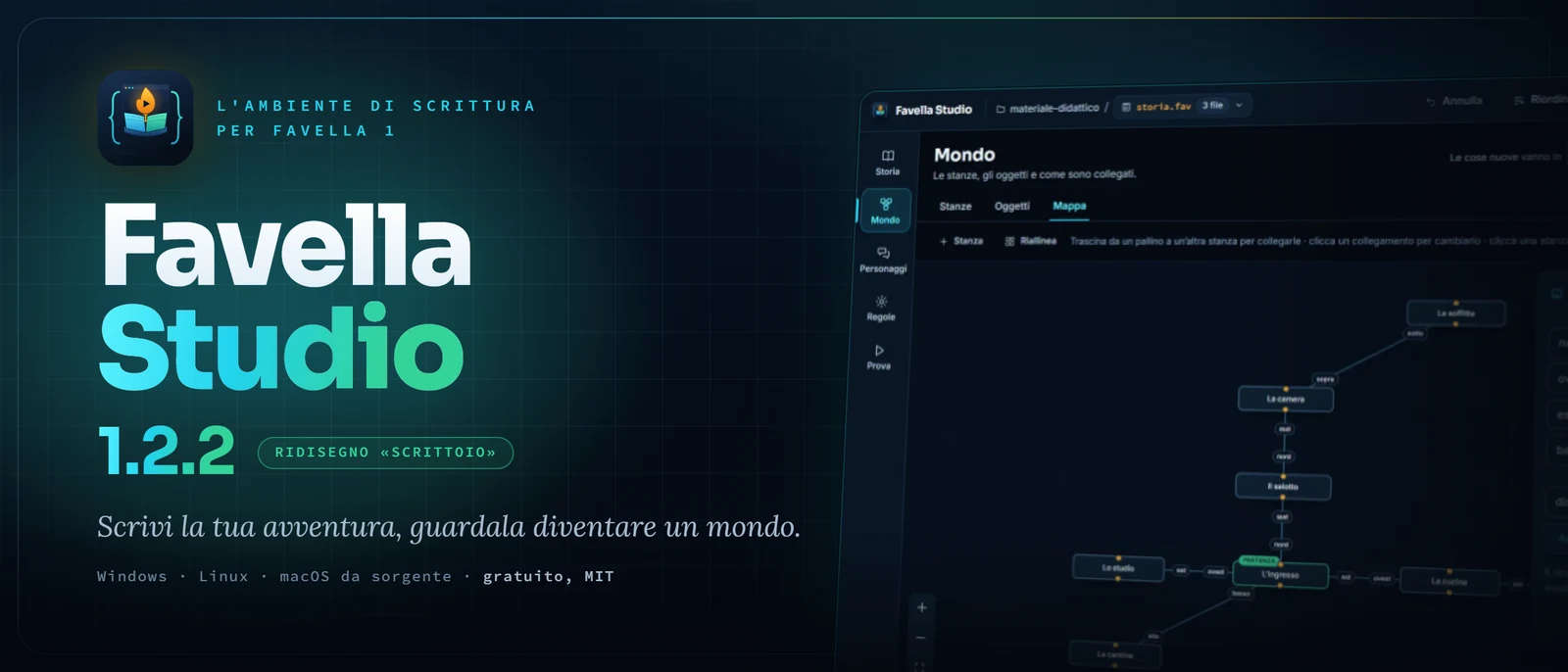
Preview
What it is
The visual writing environment for FAVELLA 1: you write the story in Italian, rooms become a map, dialogues and rules are composed without writing a line, and you test the story with verb buttons, the way whoever receives it would play it.
In FAVELLA the code is an Italian sentence with a full stop at the end: you write «La cucina è una stanza.» and the kitchen exists. Favella Studio helps you write those sentences, watch them become a world and test them the way whoever receives the adventure would play them. Inside is the real engine of the language, the same as in the terminal and on the website: what you try in Studio is what the reader will play. There is no need to install Python or anything else.
A story is a text file with the .fav extension, and Studio lets you write it in two ways that can be mixed as you like: in the text, sentence by sentence, or from the panels (rooms, objects, map, characters, dialogues, rules). Every time you create or change something from a panel, Studio writes or rewrites the right sentence in the file. There are no hidden formats and no database: the story is always and only text, which you open with any editor, copy, send, keep under version control.
It is made also for people with low vision: night or paper theme, high contrast, interface from 80 to 200 per cent, everything reachable from the keyboard, with the narrative of the game announced to screen readers. The project is finished and stable, free and under the MIT licence.
Features
- 01
Five sections, in the order in which a story is written
- 02
The text and the panels are the same thing
- 03
Rooms become a map you can drag
- 04
Dialogues as a script editable on the spot
- 05
Rules, events and daemons without writing code
- 06
Test the story with verb buttons
- 07
Export a playable web page
- 08
Every panel change can be undone
- 09
Rename and delete safely
- 10
Night, paper and high contrast
- 11
Everything from the keyboard, also for screen readers
- 12
The FAVELLA 1.4.4 engine is inside the app
- 13
Updates only with your permission
Screenshots
01 / 09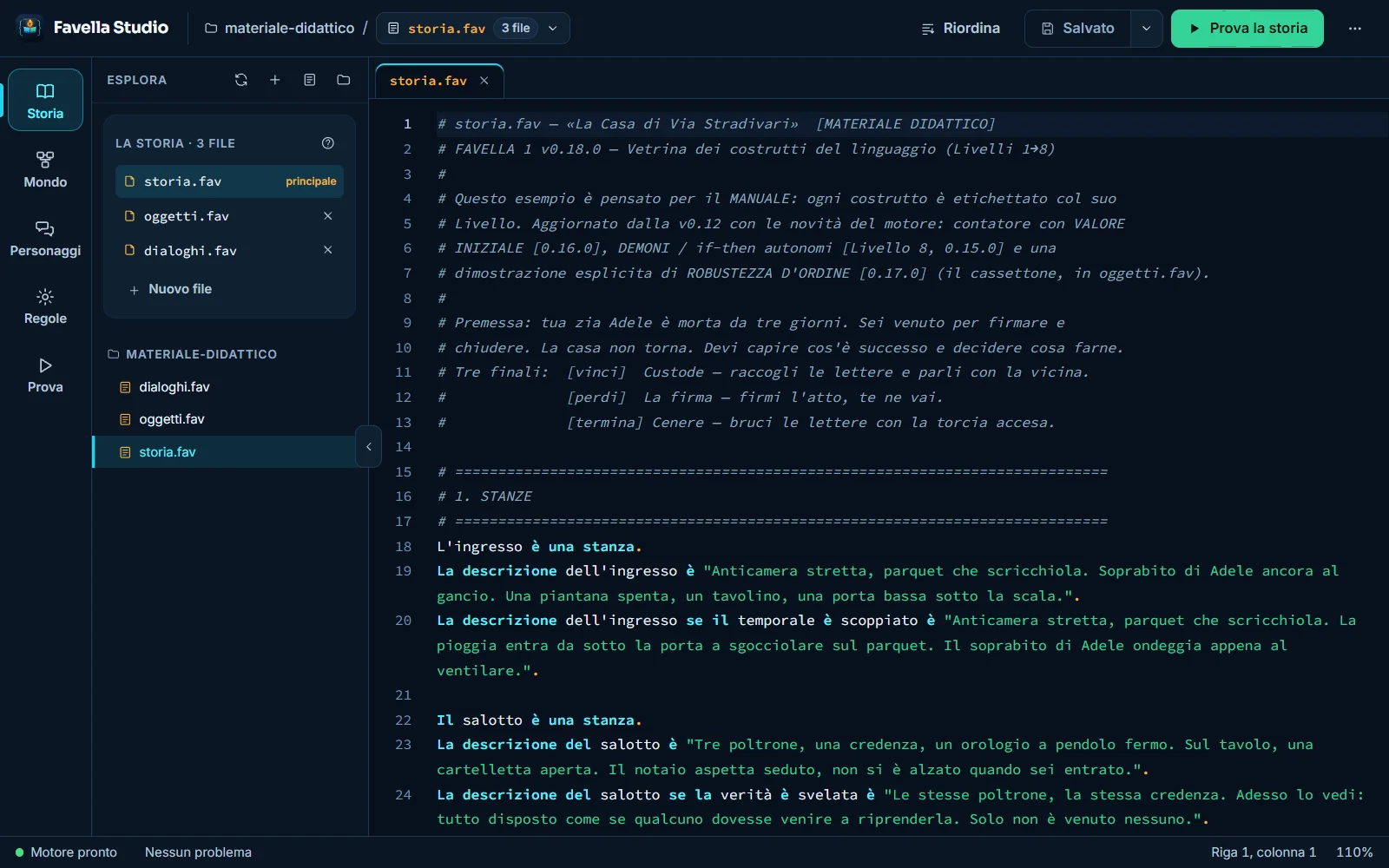
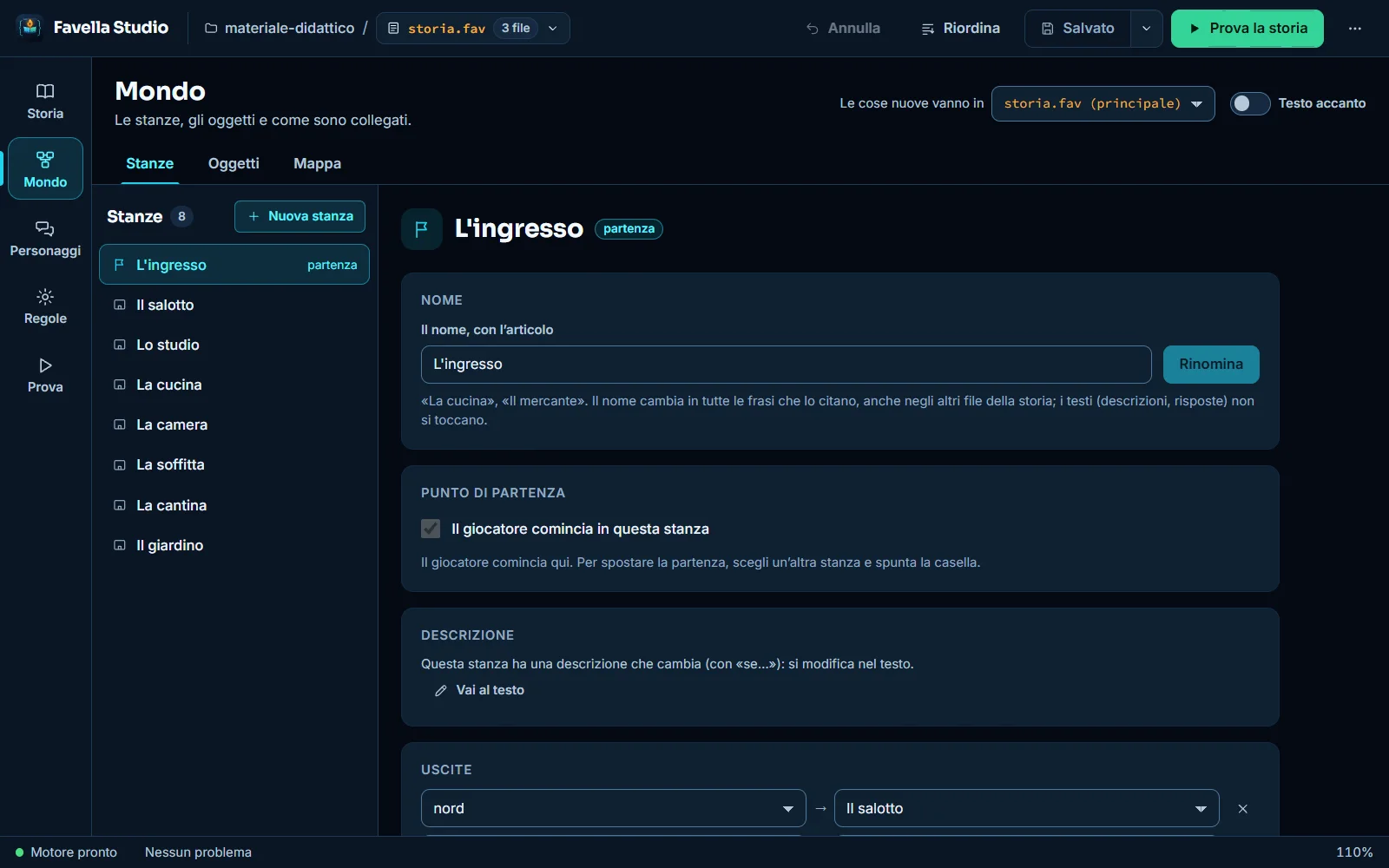
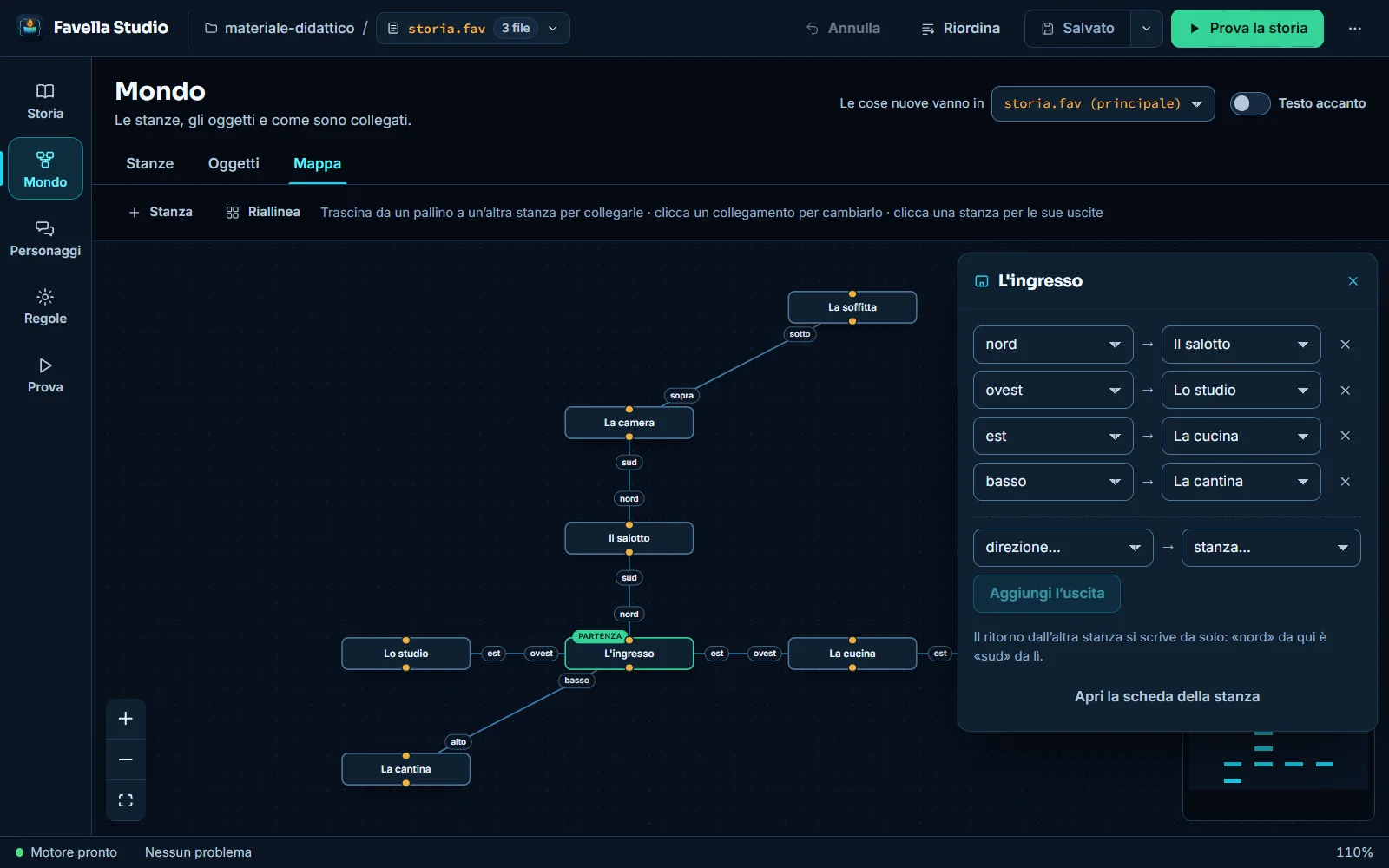
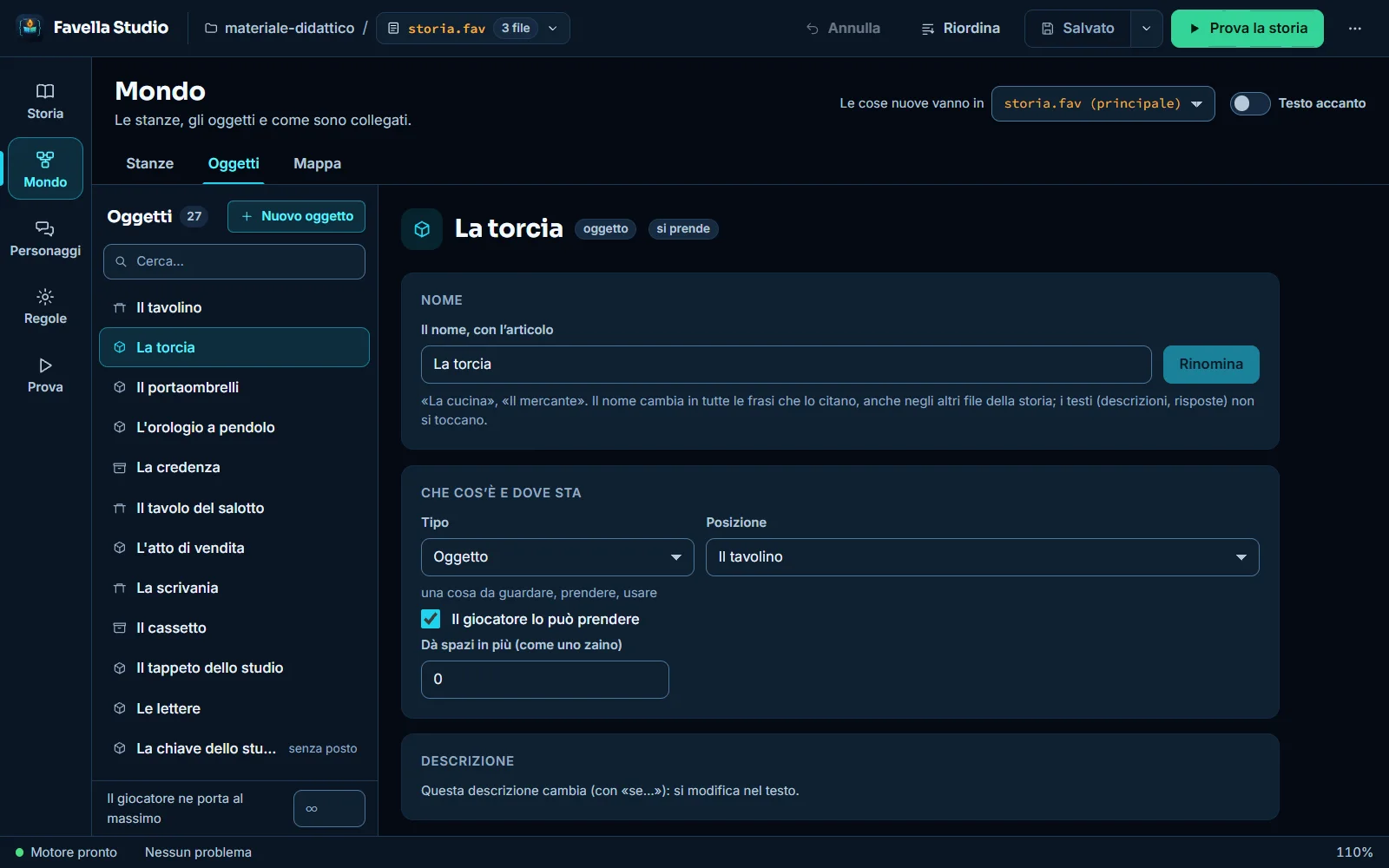
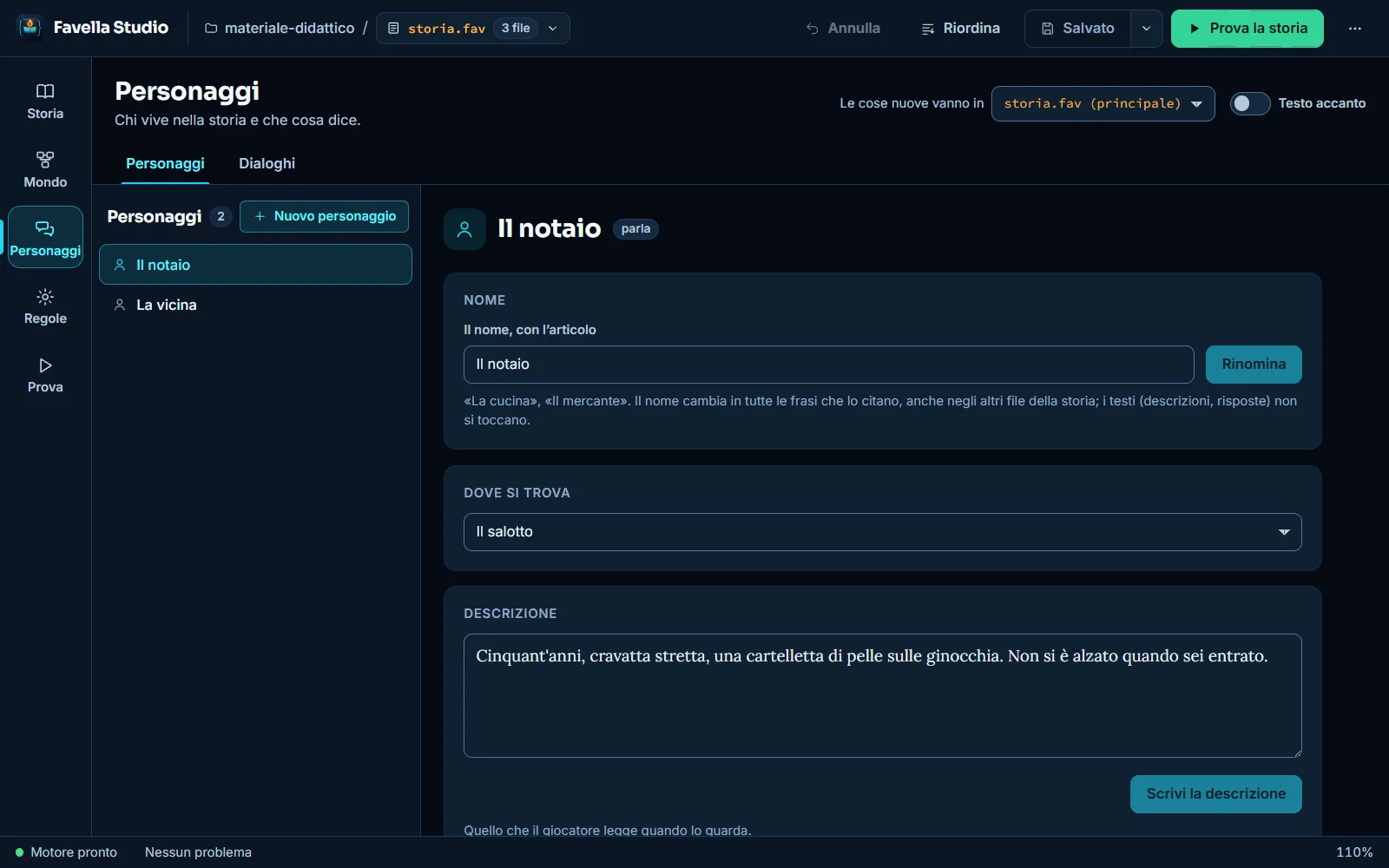
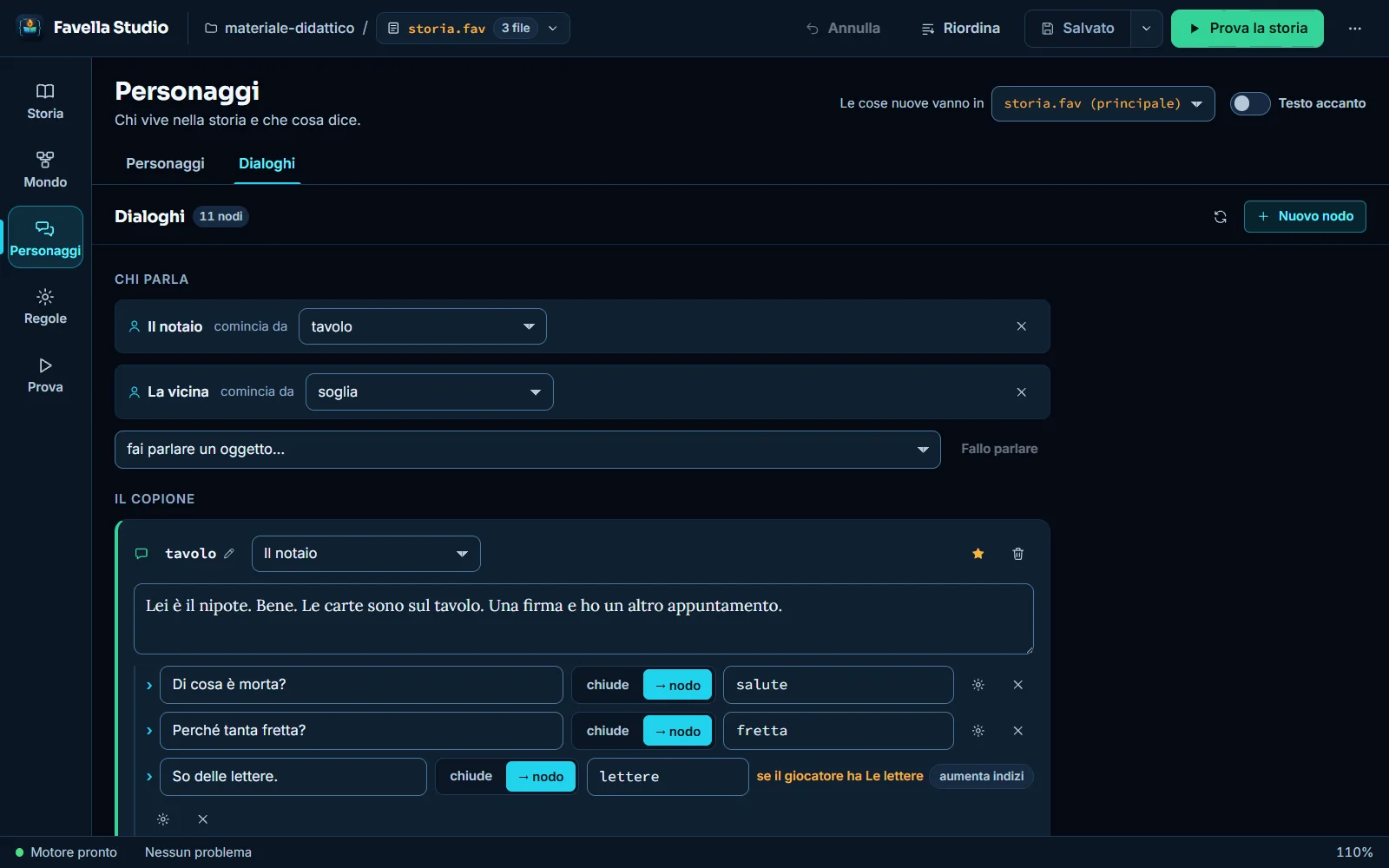
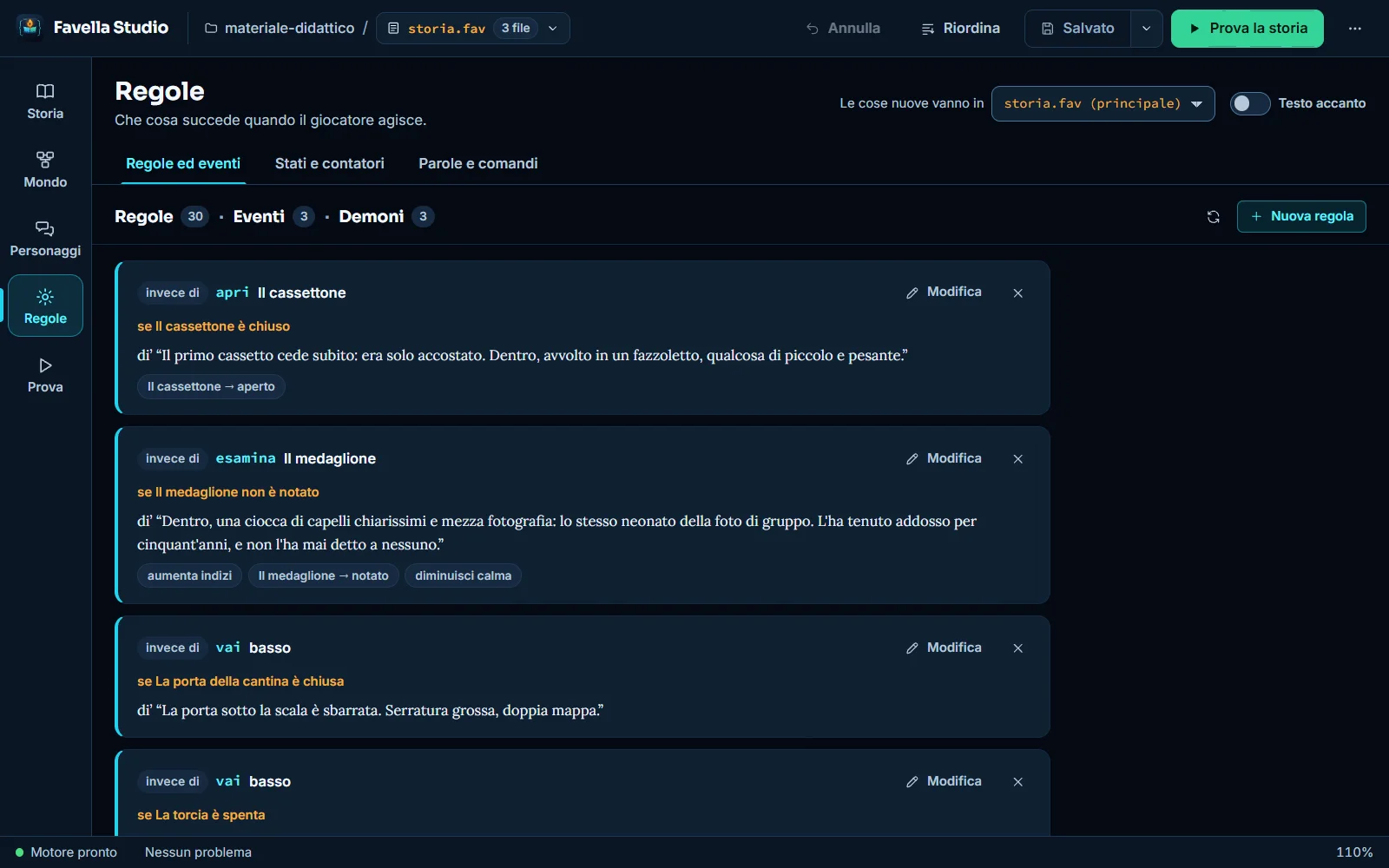
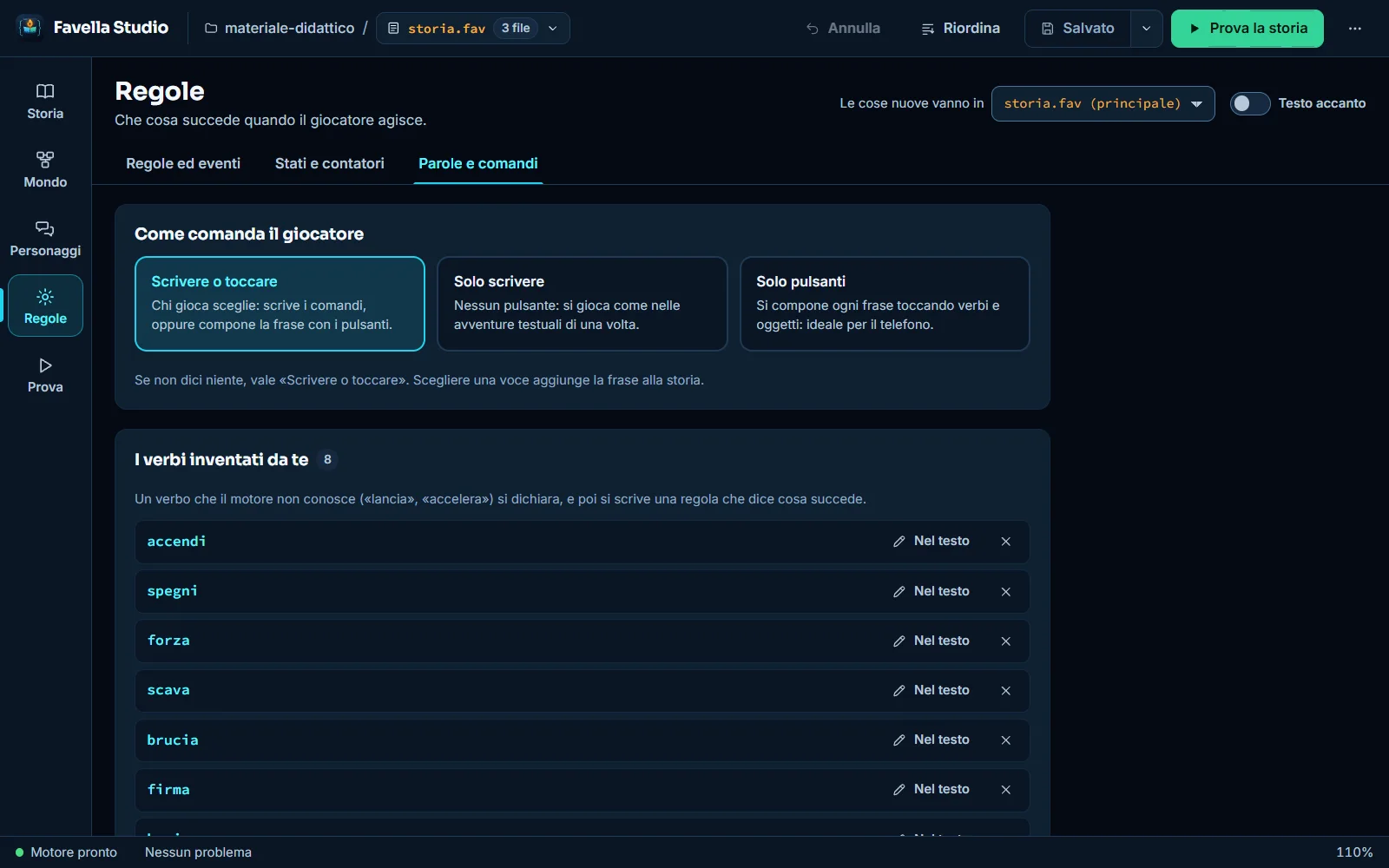
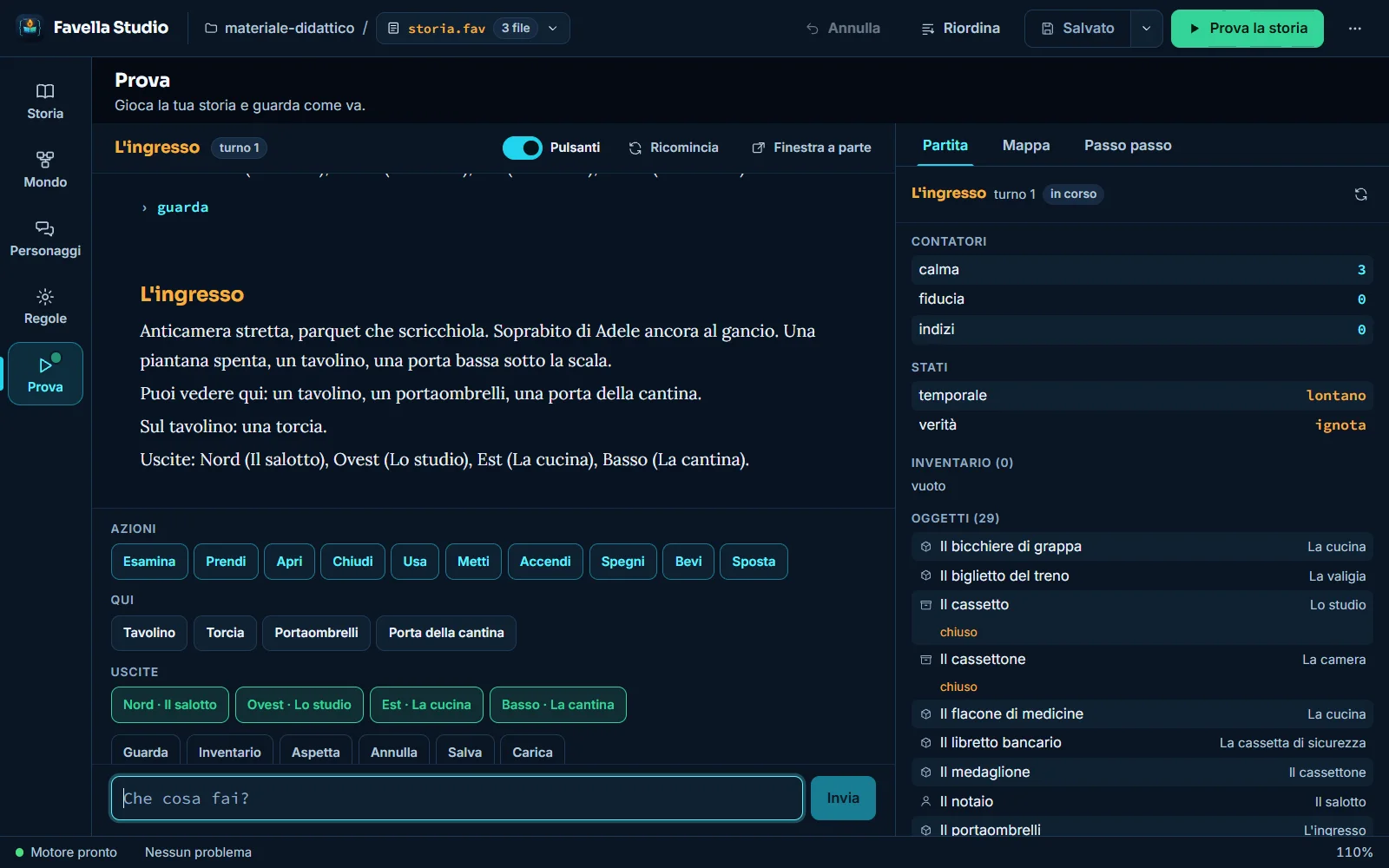
They scroll on their own. Click an image to enlarge it.
The five sections
Studio opens on five sections in the order in which a story is written, reachable with Ctrl+1 … Ctrl+5. Two signals appear on the sections: a red number on Story when the text has errors, a green dot on Test when a game is in progress.
- Story · Ctrl + 1
- The text of the story, its files, the problems the engine finds while you write.
- World · Ctrl + 2
- Rooms, objects and the map that connects them.
- Characters · Ctrl + 3
- Who lives in the story, and their dialogues.
- Rules · Ctrl + 4
- Rules, events and daemons; states and counters; words and commands.
- Test · Ctrl + 5
- The game, with the state of the world alongside. F5 tests the story.
The text and the panels are the same thing
Creating from the panel a room called «La cantina» adds the line «La cantina è una stanza.» to the file. The Text alongside switch shows the text next to any panel, so you see the sentences appear while you work. The story can be split into several files: the main one includes the others with «Includi "oggetti.fav".», and the Story panel creates a new file and includes it, or includes one that already exists. Testing, tidying, exporting and saving always work on the whole story.
The text uses the manual's colours: language words in cyan, texts in quotation marks in green, full stops in amber, comments in grey italics. The engine checks the story while you write: errors prevent compiling, and the test does not start while there are any; warnings are advice. A click on the problem leads to the right line. Tidy up (Ctrl+Alt+R) puts the text of the whole story back in order, without changing the sentences.
Building the world
The panels are all made the same way: on the left the list, with the button to create a new one and the Search field when there are more than eight; on the right the card of the chosen one. What you learn about one applies to the others.
- Rooms
- It is created by writing the name with its article («La cantina», «Lo studio»), so that the engine can write correct sentences. Exits write the way back by themselves, and directions can be invented, such as «botola» and «scala». Before a room is deleted, Studio shows every sentence that mentions it.
- Objects
- An object, a container (something goes inside) or a support (something rests on top). You decide whether the player can take it, how many extra slots it gives (like a backpack), two-value states such as open or closed, on or off, and the other names the player can call it.
- Map
- Rooms are boxes, connections are lines, and one-way ones are dashed. You connect by dragging from a dot on the edge to another room, and the way back is written by itself. Rooms are moved by dragging them and Studio remembers where you put them. The map is used with the mouse; with the keyboard the same things are done from each room's card.
- Characters
- A character is born from scratch: name, where they are, what they look like, other names, and the dialogue. An object too, a parrot, a radio, a mirror, can become a character and speak.
- Dialogues
- A dialogue is made of nodes: the character's line and the replies the player can choose, each with a condition and consequences. You write the main conversation first, then the detours: a reply can lead to a node that does not exist yet, and the node appears in the script ready to be filled in.
- Rules, events and daemons
- A rule answers a player's action (instead of, before, after). An event fires with time: at turn 10, or every 5 turns. A daemon watches the world and fires the moment a condition becomes true, and again if it turns false and then true. Conditions are built from menus, even in groups with «and» and «or»; consequences change properties, states and counters, move objects and the player, switch the light on and off, end the game.
- States, counters, words
- A state remembers a word («unknown» or «revealed»), a counter a number that goes up and down. Words and commands decide how the player commands (typing, tapping or both), declare the verbs invented by the author and synonyms: a rule for «prendi» also works for «ghermisci».
Testing the story, and giving it to players
The Test section is the story played. The engine is the same one whoever receives it will use: if it works here, it works there. Test the story (F5) compiles and takes you to the starting room; you command by typing («esamina il tavolino», «vai a nord», «parla con il notaio») or by tapping verb buttons, and on the right three tabs show the state of the world: Game, Map and Step by step, which shows turn by turn what has changed and is the right tool when a rule does not do what you expect.
Save and Load work as they do for the player; in the separate window the game can also be saved to a .favsave file, to test an ending without replaying everything. When the story is ready, Export as a playable web page creates a single .html file with the story and the real engine inside: it opens in any browser, even on a phone, and it is what you send to whoever is going to play. Players install nothing; the first time the network is needed, to download the Python interpreter that runs the engine in the browser.
Working without fear
Studio is made so that you can try things: change, delete, go back. In the text Ctrl+Z undoes the last thing written; in the panels Undo appears at the top, and undoes the last change made by a panel (a room created, an exit changed, a rule deleted, a tidy-up) even if it touched files that are not open. After a deletion a notice with its own Undo appears at the bottom.
Studio does not save by itself and does not lose unsaved work: when closing the app, opening another story or closing a tab with changes, it asks first (Save, Do not save, Cancel). If a panel hits an error, the error stays closed in there and the rest keeps working, with three buttons: Save all, Retry and Back to the text. Rename changes the name in every sentence that uses it, in all the files, and then recompiles to check that everything still fits.
A story is a folder of .fav files, and there is nothing else: no database, no hidden files. For a backup copy the folder; to work on a new version without touching the old one there is Save project as…, and Save as creates a copy of just the file in front.
Reading well, using the keyboard
Favella Studio is made also for people with low vision. It opens with the night theme, with a dark background; the paper theme has a light background; high contrast applies to both, with solid backgrounds, thick borders and a yellow outline on the active element. In all four looks every text has a contrast of at least 4.5 to 1 with its background, the threshold of the web accessibility guidelines. The interface can be enlarged from 80 to 200 per cent (110 recommended), and when space is not enough the top bar narrows by itself, leaving the buttons as icons with their name on hover.
Everything is reachable from the keyboard: Tab and Shift+Tab move from one control to another, the first Tab offers «Skip to the work area», arrows, Home, End and Enter in lists, Esc closes a window and focus returns where it was. Every button and every field has its own name for screen readers, even those that appear only as icons; dialogs are announced as such, notices are read when they appear and the game's narrative is announced as the game responds: a story can be tested without looking at the screen.
- F5
- Test the story.
- Ctrl + S · Ctrl + Shift + S
- Save all changed files; save a copy of the file as.
- Ctrl + O · Ctrl + Shift + O
- Open a story (.fav); open a folder.
- Ctrl + 1 … Ctrl + 5
- Story, World, Characters, Rules, Test.
- Ctrl + Alt + R
- Tidy up the text of the whole story.
- Ctrl + F · Ctrl + H
- Search the text; search and replace.
- Ctrl + + · Ctrl + - · Ctrl + 0
- Larger interface, smaller, recommended size. On macOS, Cmd is used instead of Ctrl.
How to install and update it
The installers for Windows and Linux are on the project's releases page on GitHub (the ones called «Favella Studio»). The installers are not signed with a paid certificate, and on macOS an app not signed by Apple would be blocked: that is why the Mac version is built by yourself, with one command, following the instructions in studio/BUILD-MACOS.md.
On first start Studio asks a single question: do you want to know when a new version comes out? If the answer is yes, at every start it asks GitHub for the latest version and sends nothing of yours; if it is no, it never connects to the internet on its own. A downloaded file is installed only if its SHA-256 fingerprint is identical to the published one, and only after asking about unsaved files. Stories have nothing to do with the update: they stay in their own folders and are not touched.
- Windows
- FavellaStudio-Setup-1.2.2.exe. If «Windows protected your PC» appears, choose More info and then Run anyway.
- Linux
- FavellaStudio-1.2.2.AppImage: the whole app in a single file, for any 64-bit distribution. You make it executable (chmod +x) and open it; on some distributions the FUSE package is needed, usually libfuse2.
- macOS
- There is no ready-made installer. You build it in a few minutes on your own Mac, and the resulting app is your own and the Mac trusts it. On macOS the update is downloaded and installed by hand.
- Example story
- From the More actions menu, «Open the example story» opens «La Casa di Via Stradivari», the same story as the manual: eight rooms, almost thirty objects, two characters with their dialogues, rules, events and three endings. Studio makes a copy in the Documents folder, under Favella Studio.
The guide and the manual
The Favella Studio user guide has 45 pages in fourteen chapters, with thirty-eight figures taken from the real app, and is free as a PDF: it also opens inside the app, from the More actions menu. The language, that is how a rule is written, what a daemon can do, how a dialogue is built, is explained by the FAVELLA 1 Programming Manual. The two go well together: the panels show which sentences exist, the manual says everything they can say. Their pages are linked below.
Under the hood
Studio is an Electron application with an interface in React, Vite and TypeScript. The FAVELLA engine, in Python, stays entirely the original one: it runs as a separate process (sidecar) with which the interface talks via JSON-RPC over NDJSON, with a strict control of channels so that nothing the engine prints touches the protocol, and a supervisor that restarts it if needed. The engine is included in the app, frozen for each operating system: that is why there is no need to install Python.
The visual system is called «Scrittoio» and keeps every text at least 4.5 to 1 against its background. The code is in the studio/ folder of the FAVELLA1 repository, under the MIT licence.
A finished project
Favella Studio is the writing home of FAVELLA 1, which is a finished project: version 1.4.4 of the engine is the definitive one and will not be modified again. Studio too is finished and stable, at version 1.2.2, the last of its revisions (a correctness patch: the daemon's label now tells the truth, and the guide was revised). The repository stays open, under the MIT licence, for anyone who wants to learn, pick up the work or take it somewhere else. The project's official home is favella.eu.
Technical sheet
- Version
- 1.2.2
- License
- MIT · free software
- Platforms
- Windows · Linux · macOS to be built
- Installers
- Windows .exe (about 114 MB) · Linux AppImage (about 161 MB)
- Engine
- FAVELLA 1.4.4, included in the app
- Architecture
- Electron + React + Vite + TypeScript, Python engine as a sidecar
- Look
- Night · paper · high contrast
- Interface
- From 80 to 200 per cent · contrast of at least 4.5 to 1
- Updates
- With consent · installed only if the SHA-256 fingerprint matches
- Guide
- 45 pages, as a PDF and inside the app
- Language
- Italian
- Status
- Finished and stable
- Status
- Available
Available
Ready to try it?
Get it from the releases page, with the source open.
Other versions: macOS (built on your own Mac)

Universo Favella
In Universo Favella
FAVELLA is the programming language in Italian for interactive fiction. These pages are part of the same world.
 Universo Favella
FAVELLA 1
An interactive fiction engine you program in Italian.
Discover → Universo Favella
FAVELLA 1: Manuale di Programmazione
Write a story. Get a world.
Discover →Universo Favella
FAVELLA 1: Manuale di Programmazione (ebook)
Write a story. Get a world.
Discover → Universo Favella
Favella Studio: Guida all'uso
The step-by-step guide to Favella Studio, the writing environment of FAVELLA 1.
Discover → Universo Favella
Il Viaggiatore
A text adventure of survival and journey, written in FAVELLA 1.
Discover →