Utilities · v2.5.0
Runtime TelegramBot Desktop Titan Edition
Limitless Telegram Automation
The story of Titan

From a Python script in a black window to a free, open-source desktop app that posts your RSS feeds, podcasts and YouTube videos to Telegram channels. This is the story of Titan.
The video is on YouTube: it loads only when you press play. Open on YouTube
What it is
Connect as many RSS feeds, podcasts and YouTube channels as you like to Telegram, from Windows or Linux. It runs locally: no subscription, no message cap set by a plan.
Runtime TelegramBot Desktop Titan Edition is a desktop application that watches RSS feeds, podcasts and YouTube channels and automatically publishes the new content to your Telegram channels. It manages several bots and channels together from a single interface, and it is made for people who run communities, news outlets, radio stations or YouTube channels and need to distribute content continuously, without following the sources by hand.
The difference from cloud services lies in where it runs. Those live on someone else’s servers, often with a subscription and a cap on messages. Titan runs on your computer or your server: data and credentials stay on your machine, there is no fee and no commercial plan limits the messages sent. Only Telegram’s normal anti-spam limits remain, and Titan handles those by itself.
YouTube is read without an API key and without Google Cloud, bot tokens are encrypted, quiet hours put content in a queue saved on disk and release it when they end, and every day Titan saves a copy of its database by itself. No telemetry, no account. It is free software under the MIT licence.
Features
- 01
Real Multi-Channel
- 02
YouTube Zero-Config
- 03
Status of Every Source
- 04
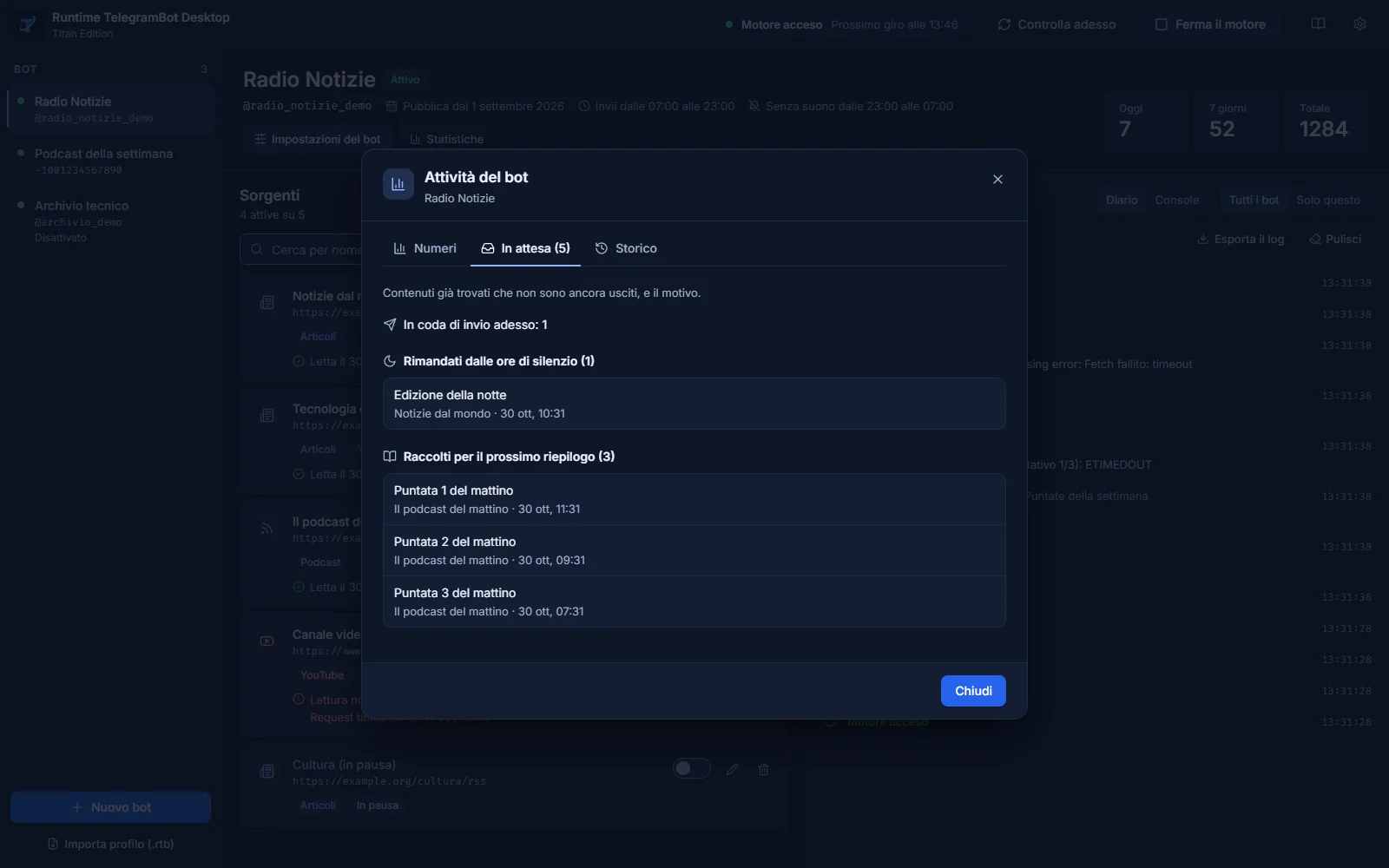
Bot Activity: Queues and History
- 05
Group Topics
- 06
Test the Bot and Check Now
- 07
Working Even With the Window Closed
- 08
Silent Hours
- 09
Publishing Without Sound
- 10
Templates with Smart Chips
- 11
Keyword Filters
- 12
Scheduled Digest
- 13
OPML Import
- 14
Encrypted Tokens
- 15
Daily Backup
- 16
Automatic Updates
Screenshots
01 / 13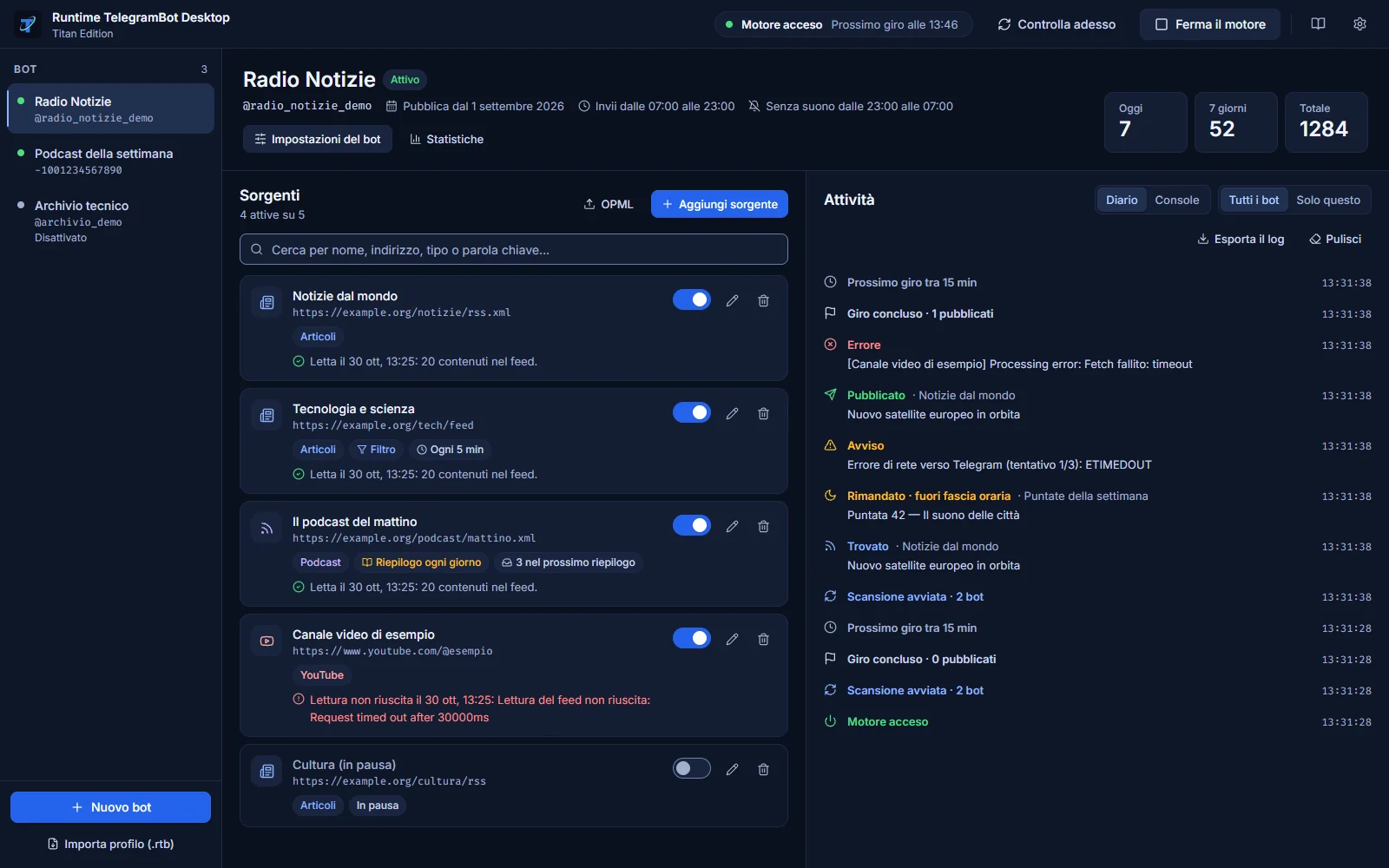
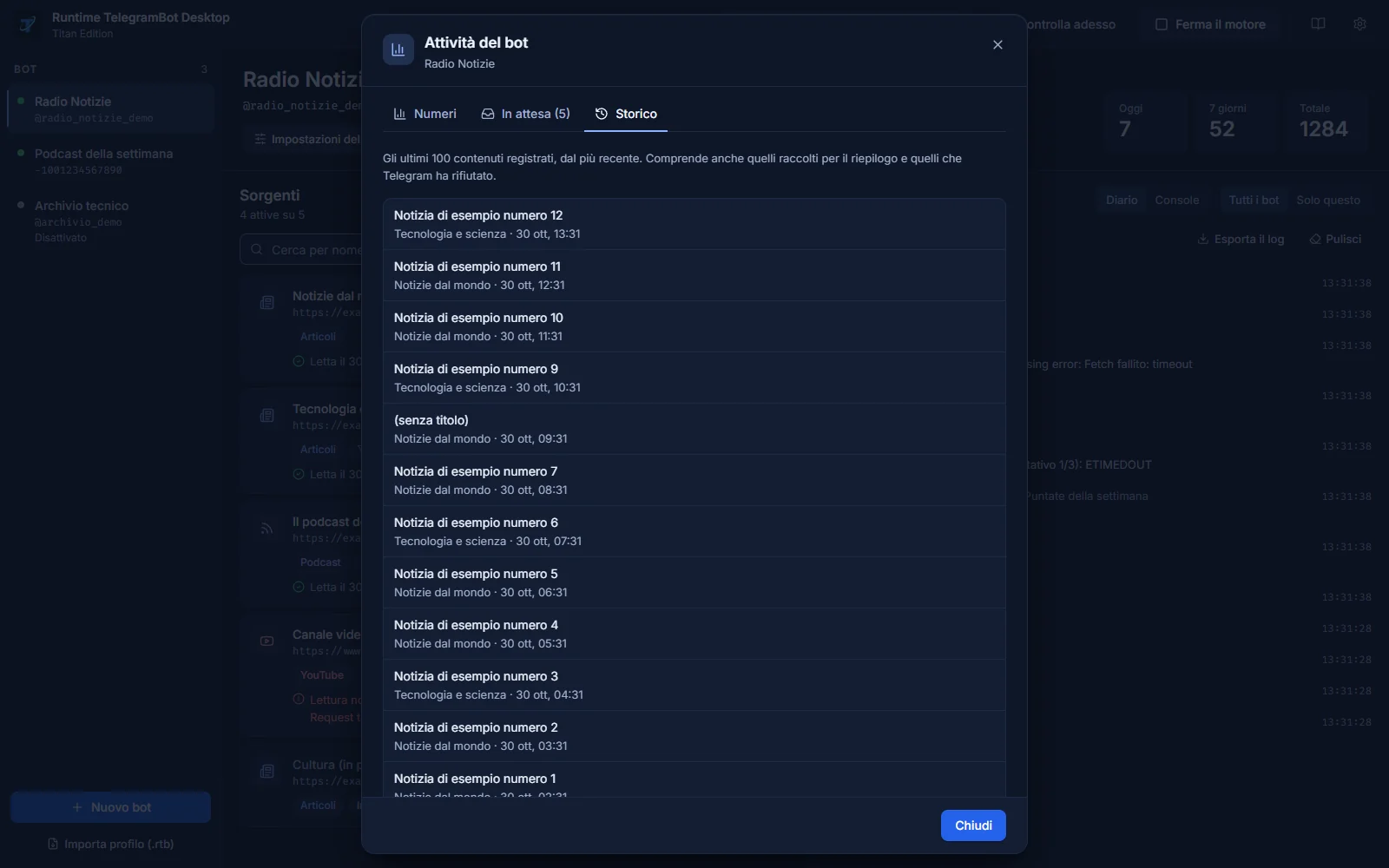
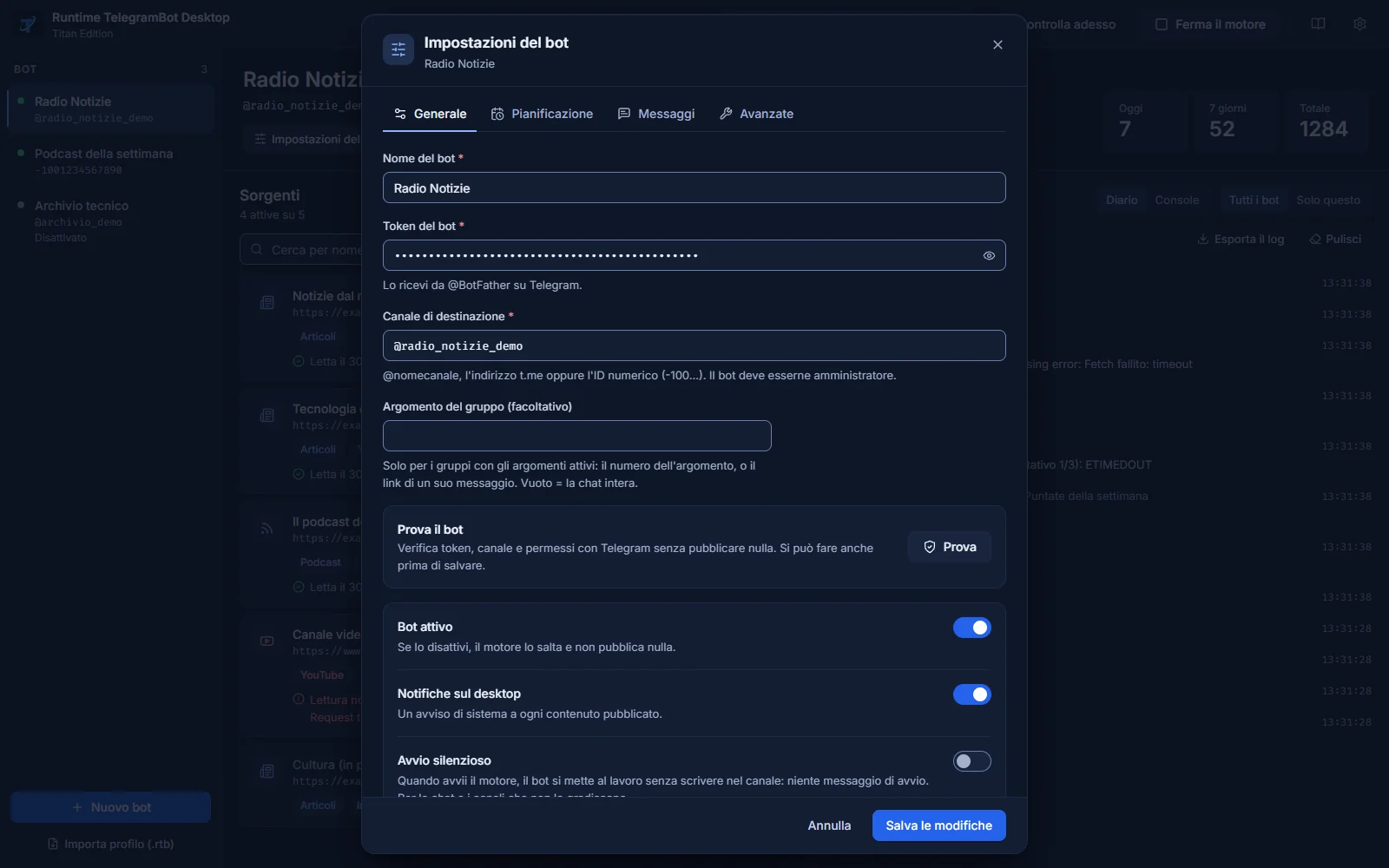
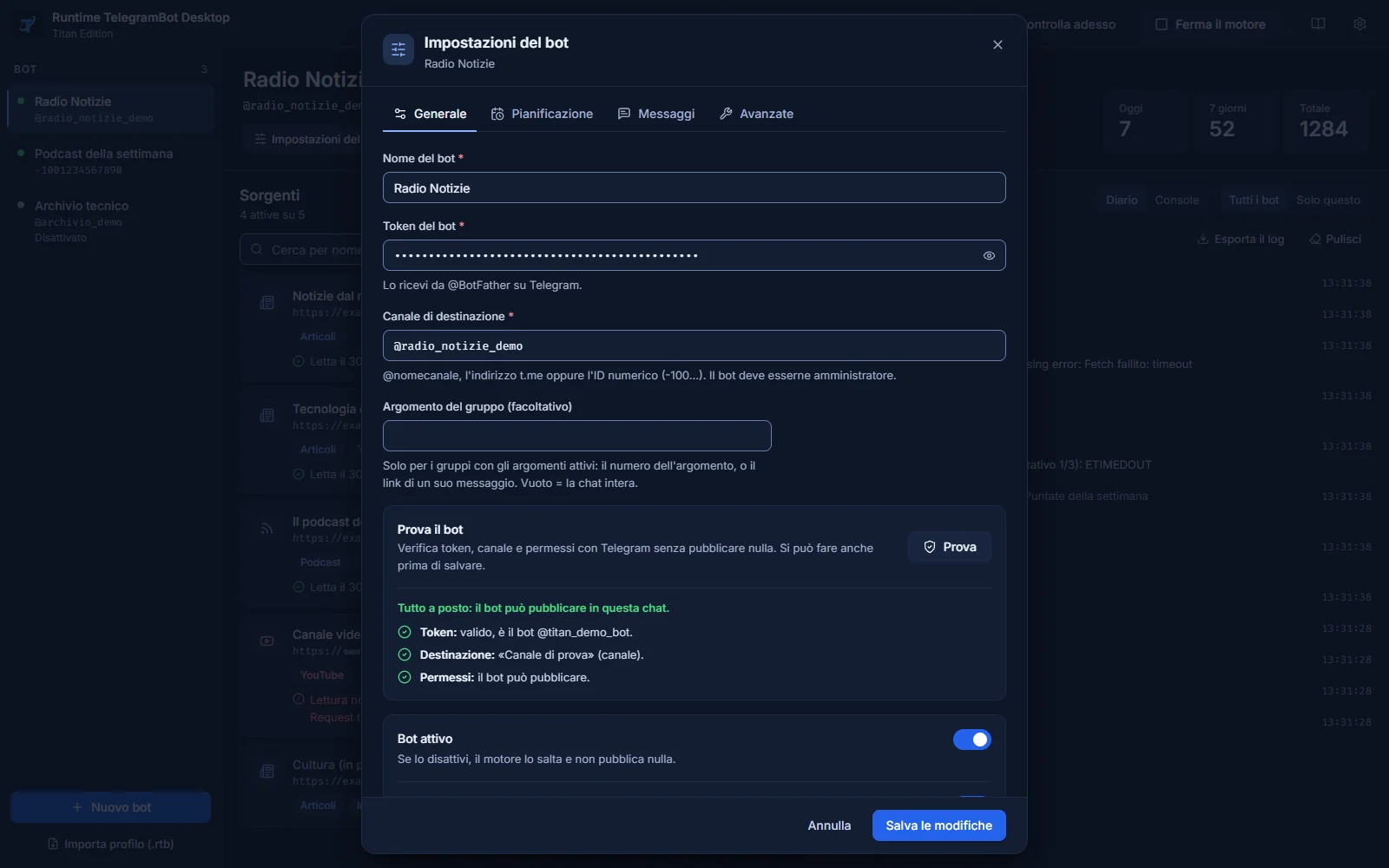
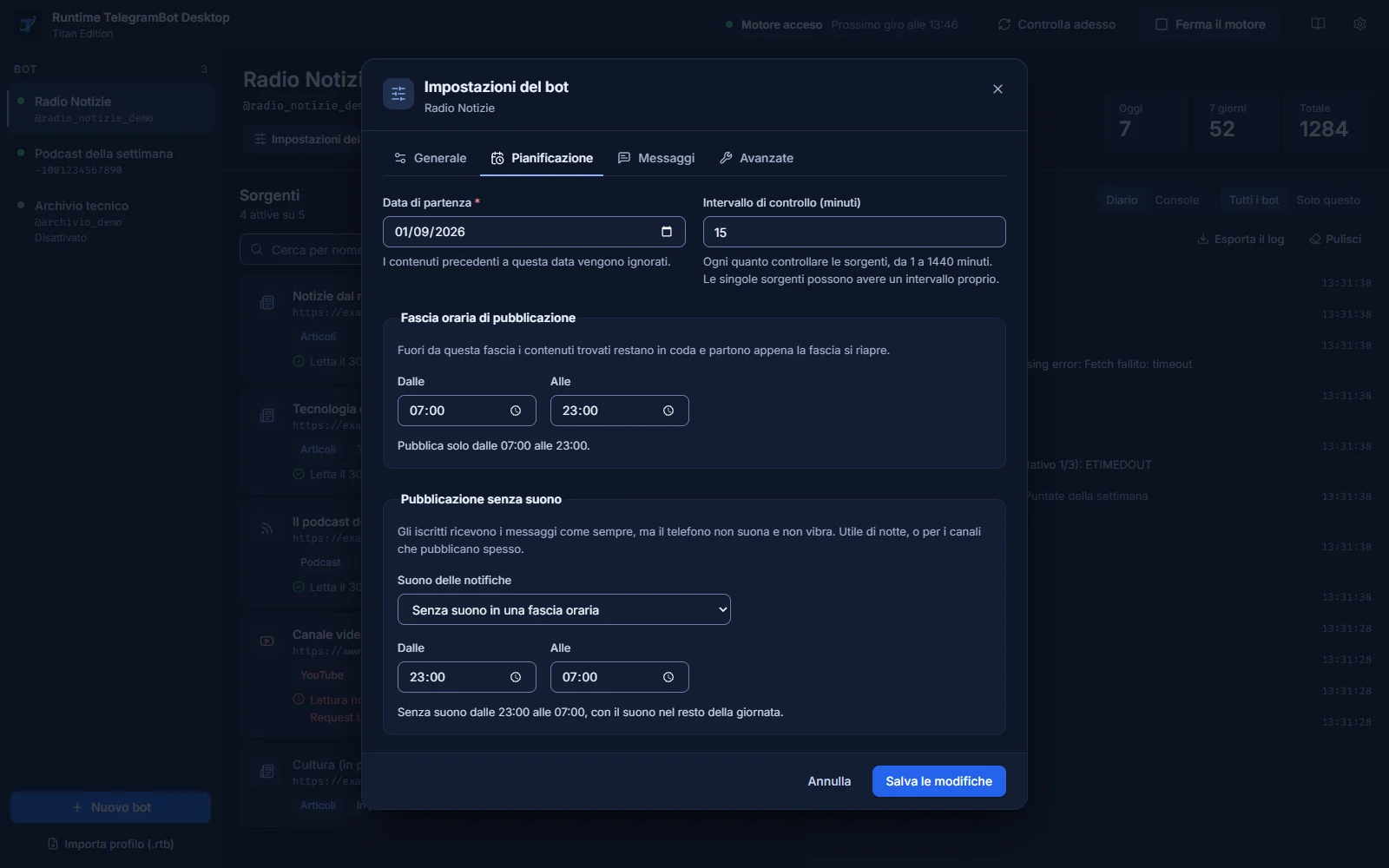
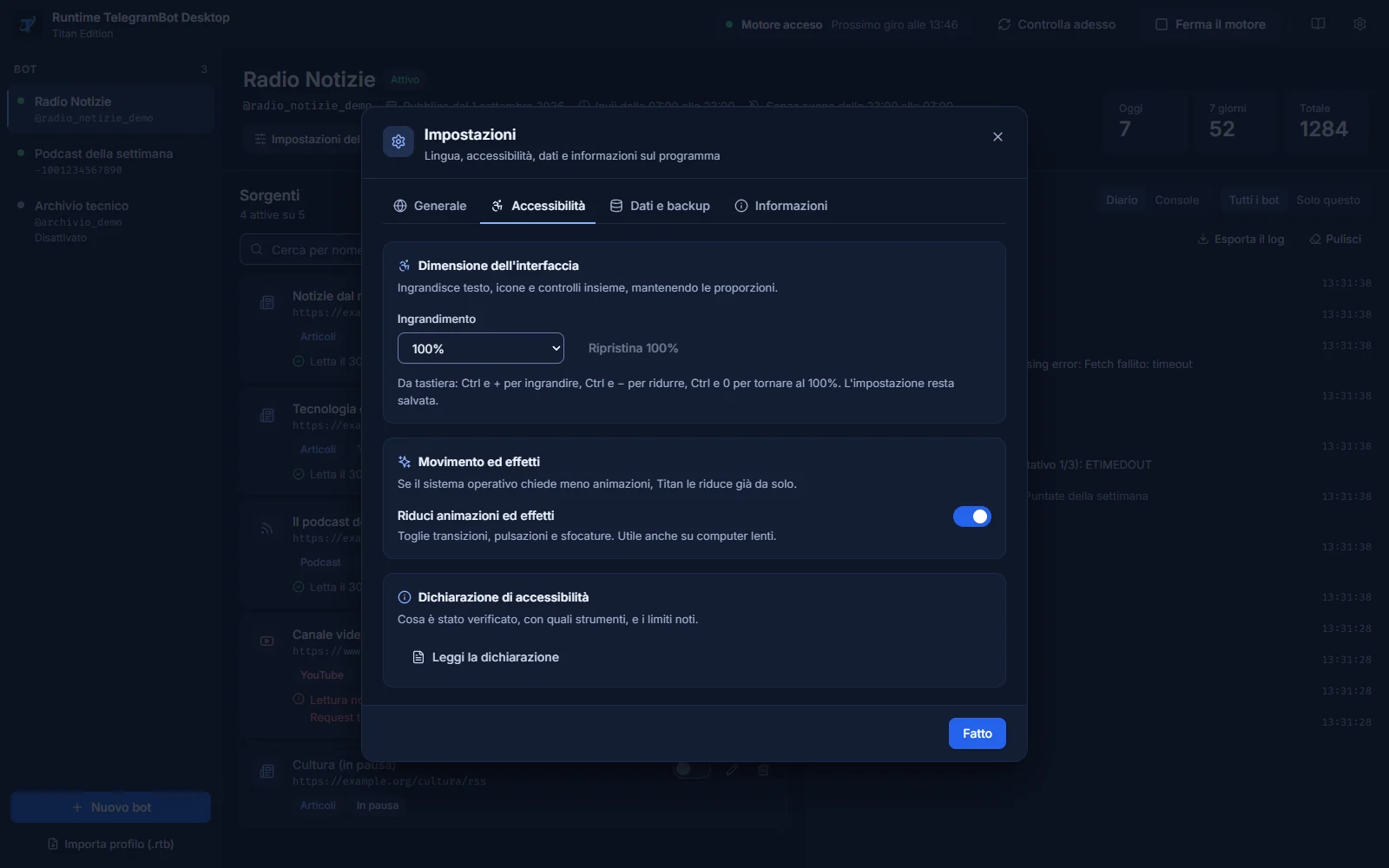
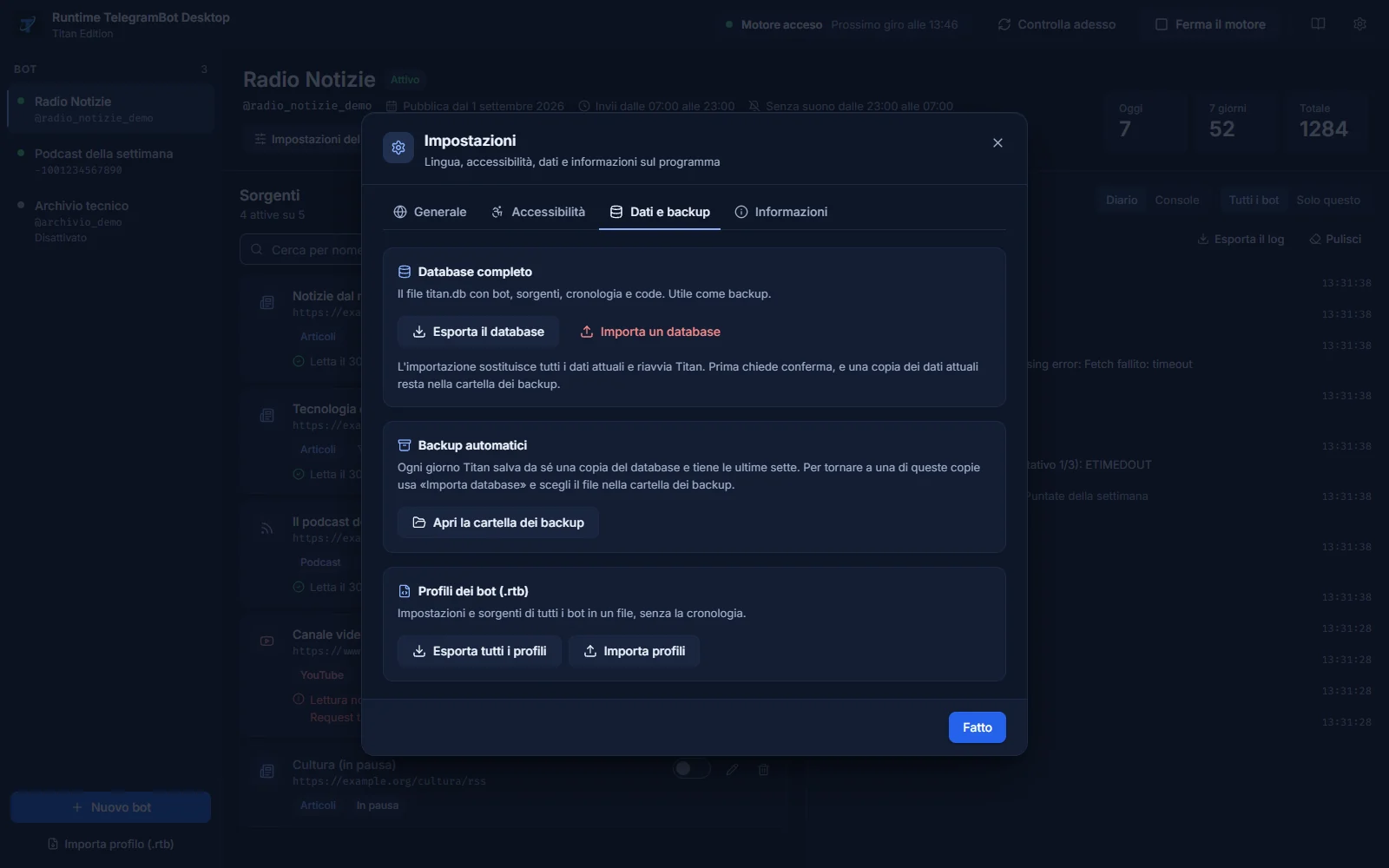
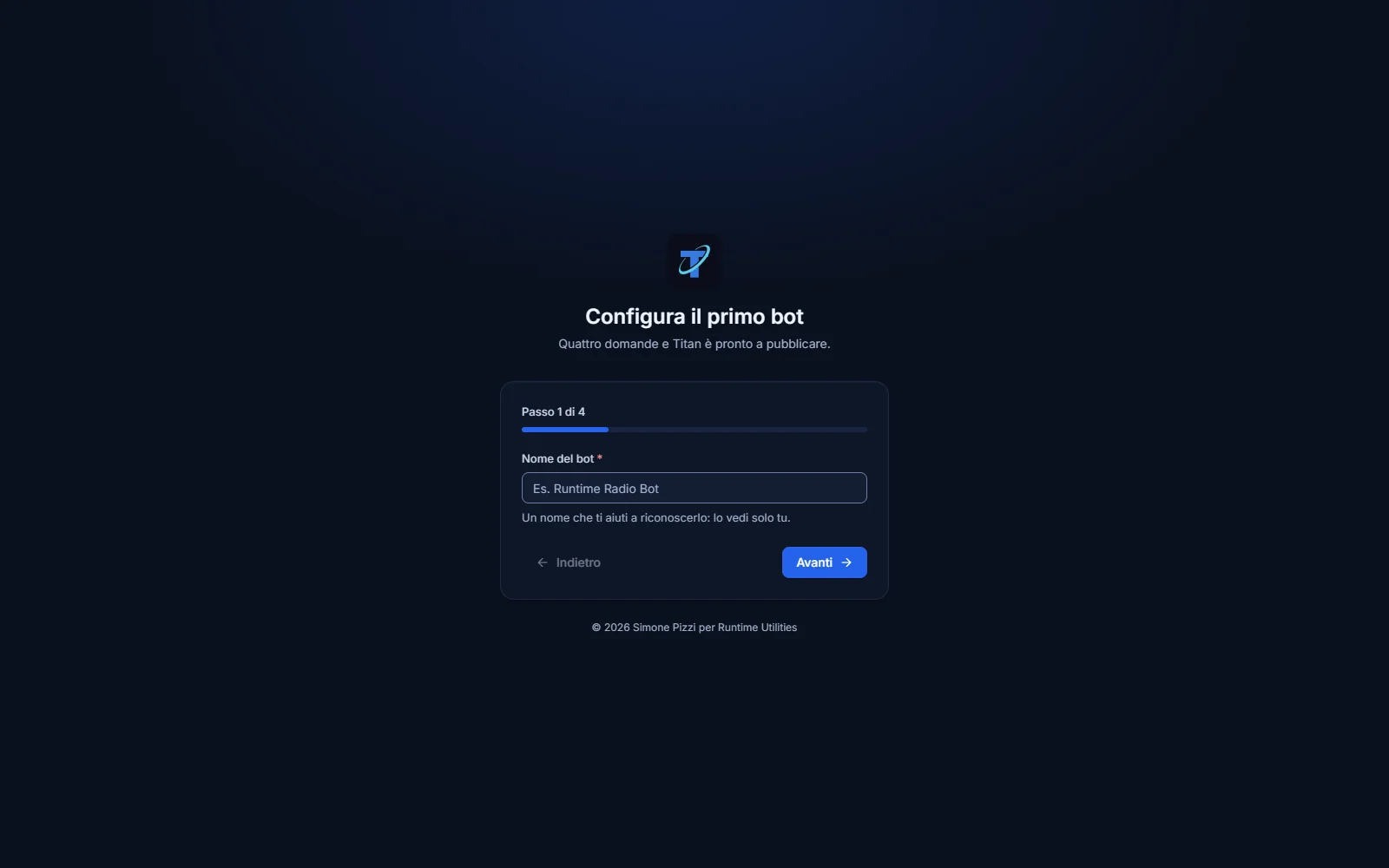
They scroll on their own. Click an image to enlarge it.
How it works
Titan keeps two activities separate. One continuously downloads content from your sources; the other formats it and sends it to Telegram. That way downloading never waits for sending, and sending respects the pauses Telegram imposes so you are not mistaken for spam, the so-called FloodWait. It is the producer-consumer architecture.
Every time it publishes an article or a video, Titan computes a fingerprint of it and records it in its internal database. This memory keeps it from republishing the same news, even if you switch the computer off for two days and turn it on again.
The network can fail, and Titan allows for it. If a feed does not answer, the connection drops or the server is overloaded, the read is repeated after 5 seconds. The same feed is read once per round even when several bots use it, and at most three reads go to the same server at once. A send to Telegram that hangs is cut off after 45 seconds instead of blocking the queue, and after the computer sleeps Titan waits for the network to come back and checks all sources.
There is a single engine for all active bots: it is started and stopped from the top bar, which also shows the status and the time of the next round. The selection on the left is only for looking at a profile’s configuration.
How to install it
It is downloaded from the project’s releases page on GitHub. Titan runs on Windows 10 or later (64-bit) and on 64-bit Linux, with an x64 or arm64 processor; it can also run on a VPS server without a dedicated graphics card.
On the first start after an update a full-page «What’s new» screen appears, with the list of what has changed. It shows only once per version.
- Windows
- Two files: Setup, the installer, which creates a desktop shortcut; and Portable, a single executable that installs nothing, to be copied anywhere, even on a USB stick, and which does not update itself. As they are unsigned, SmartScreen shows a warning on first start: More info, then Run anyway.
- Linux
- Five formats, each in x64 and arm64: AppImage (all distributions, to be made executable), .deb (Ubuntu, Debian and derivatives), .rpm (Fedora, RHEL, openSUSE), .pacman (Arch) and a .tar.gz archive. libsecret-1-0 and libfuse2 may be needed.
- macOS
- There is no official installer: it is not a technical limit, but a .dmg that does not trigger the Gatekeeper warning requires a paid Apple certificate, and it makes no sense to keep one for a project with no revenue. It is built from source (Node 22 and the Xcode Command Line Tools are needed).
- Updates
- Titan checks by itself whether there is a new version and asks for confirmation before downloading and before restarting. The Windows installer and the AppImage replace themselves; .deb and .rpm try to but ask for the administrator password; portable, .pacman and .tar.gz must be downloaded again by hand.
The first start
The entry screen composes itself in under four seconds: the logo enters inside an orbit, a satellite travels along it and stops next to the logo, then everything stays still; with reduced motion it appears already composed. On the first start, after choosing the language, the wizard sets up the first automation in four steps, and at the third «Test the bot» checks token and channel before starting.
From the entry screen you change language and reach the Quick Guide, the PDF manual and the page to support the project.
- Bot Name
- A descriptive name to recognise the profile in the interface («Sports News Bot»). It is not visible to users on Telegram.
- Bot Token
- The secret token generated by @BotFather.
- Channel ID
- The channel’s public name with the at sign (@mychannel) or, if it is private, its numeric identifier, which usually starts with a minus sign (-100123456789).
- Start Date
- By default it is today. Titan discards any content published before this date, so as not to flood the channel with weeks-old news.
The command deck
At the top is the engine bar: the status, the time of the next round, «Check now», which runs a round on all active sources at once, and the button that starts and stops the engine. On the left the list of bots; in the middle the header of the chosen bot, with channel, start date, hours and the counters for today, seven days and total. Below, side by side, the sources and the engine’s activity; on narrow screens they become two tabs.
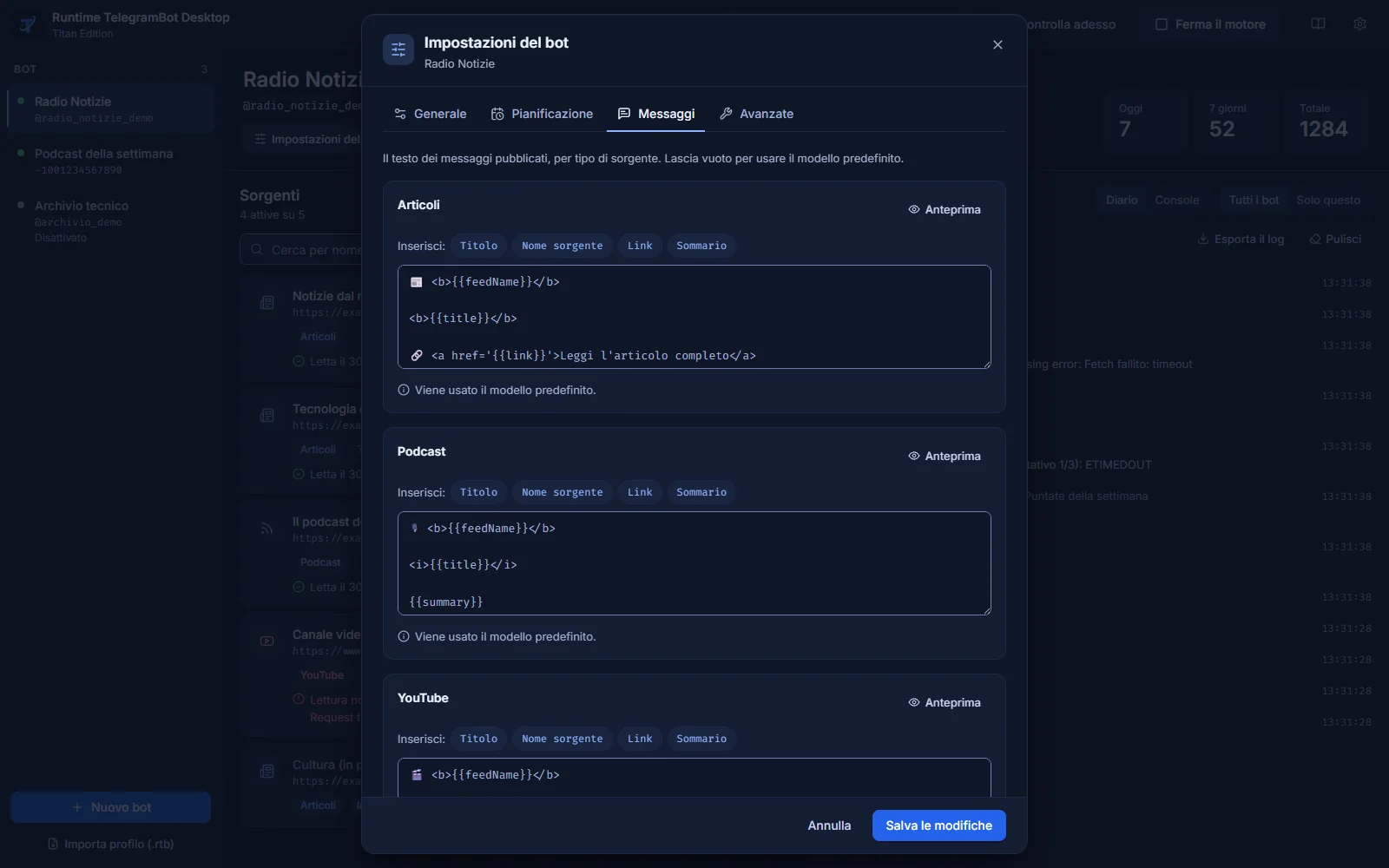
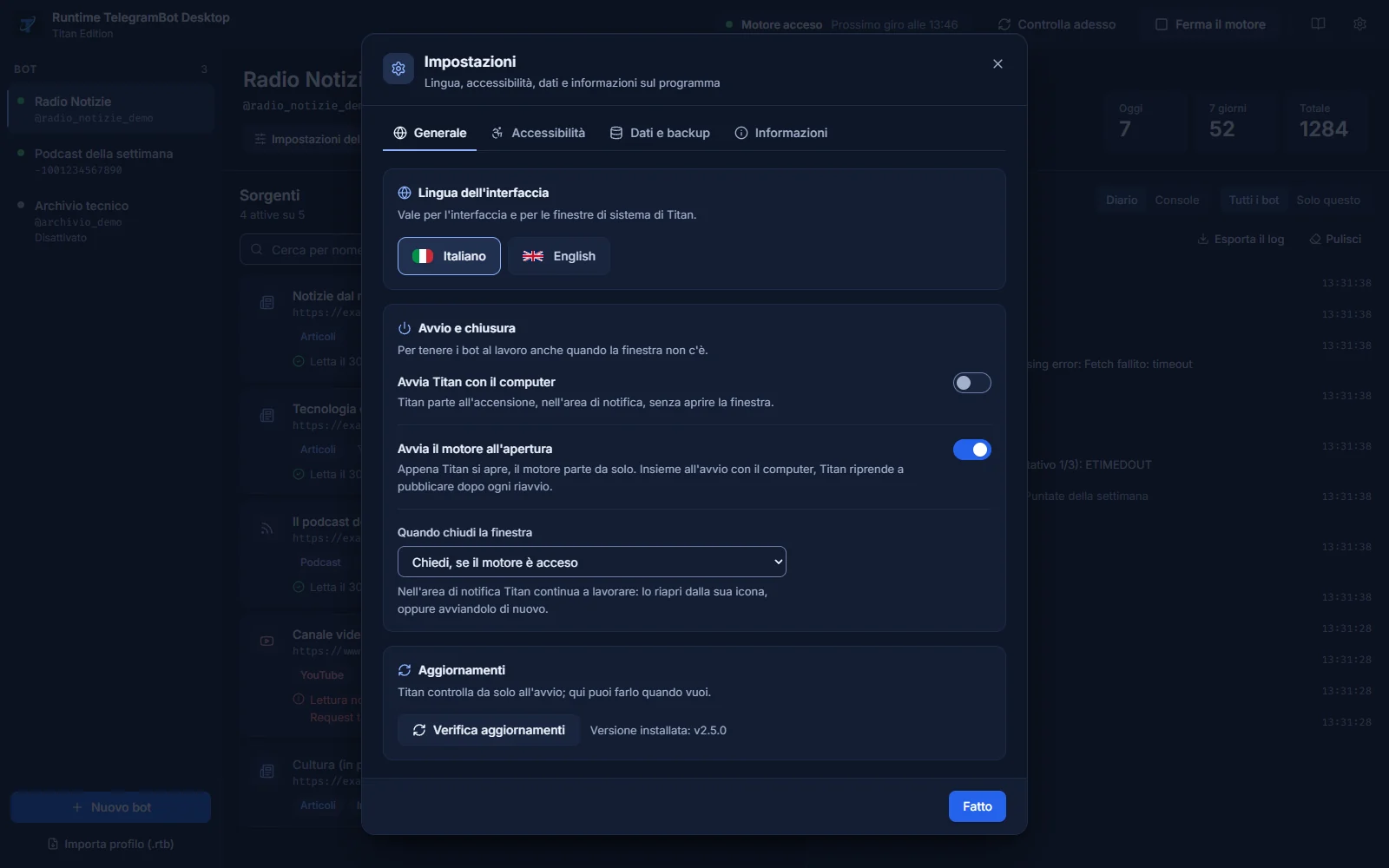
New bot, new source and bot settings open in windows of their own. Settings have four tabs: General, Schedule, Messages and Advanced, which also holds clearing the history and deleting the bot.
- Journal and console
- The journal shows the events that matter (round started and finished, item found, published, held back) and everything that went wrong, with colours and icons, in the app’s language. The technical console, behind a switch, has every line from the engine. You can filter between all bots and the chosen one, export the day’s log and clear the view without touching the history.
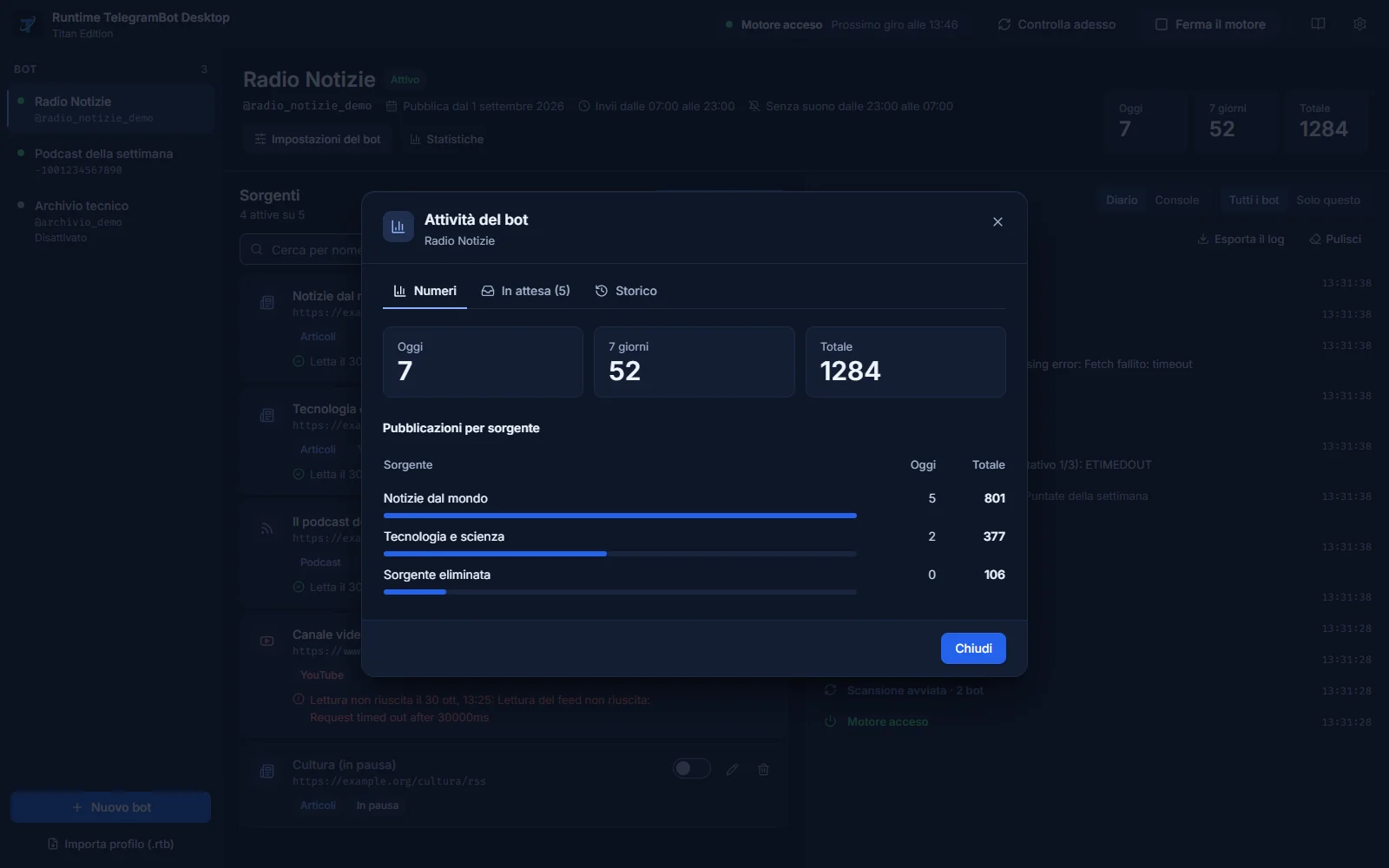
- Bot activity
- A window with three tabs. Numbers: today, seven days, total and the posts of every source. Waiting: what has been found and has not gone out yet, and why (in the send queue, held back by quiet hours, collected for the next digest). History: the last 100 items recorded, including those collected for a digest and those Telegram refused, which will not go out again.
- Always at work
- With the engine running, closing the window first asks whether to stay in the notification area or quit, and can remember the answer. Titan can start with the computer, with no window, and turn the engine on by itself: after a restart it goes back to publishing without anyone opening it. The notification-area icon shows the status and has the essential commands.
Bots and channels
Titan is multi-channel: several bots from the same window, each with its own channel. Whoever runs a radio can have one channel for written news, one for audio episodes and one for behind the scenes, without installing the program three times. Each profile lives on its own, with its feeds, its hours and its templates; when Play is pressed, Titan serves all active bots in rotation.
The token is obtained from @BotFather, on Telegram: you send /newbot, choose a name and a username ending in «bot», and BotFather replies with the string to paste. Titan saves it encrypted, tied to the computer.
For public channels it is enough to paste the link: Titan strips the prefix and adds the at sign, so «https://t.me/mychannel», «t.me/mychannel» and «mychannel» all become @mychannel. Private channels have a numeric identifier, found by forwarding a message from the channel to a service bot such as @getidsbot.
Before starting the bot, it must be added among the Telegram channel’s Administrators with permission to send messages. «Test the bot», in the settings and in the wizard, asks Telegram whether the token is valid, whether the destination exists and whether the bot can post there, without writing anything in the channel.
In Telegram groups with topics, a bot can post in a specific topic instead of «General»: in the settings you type the topic’s number, or paste the link of one of its messages as Telegram copies it. The startup message and the digests go to the topic too.
The sources
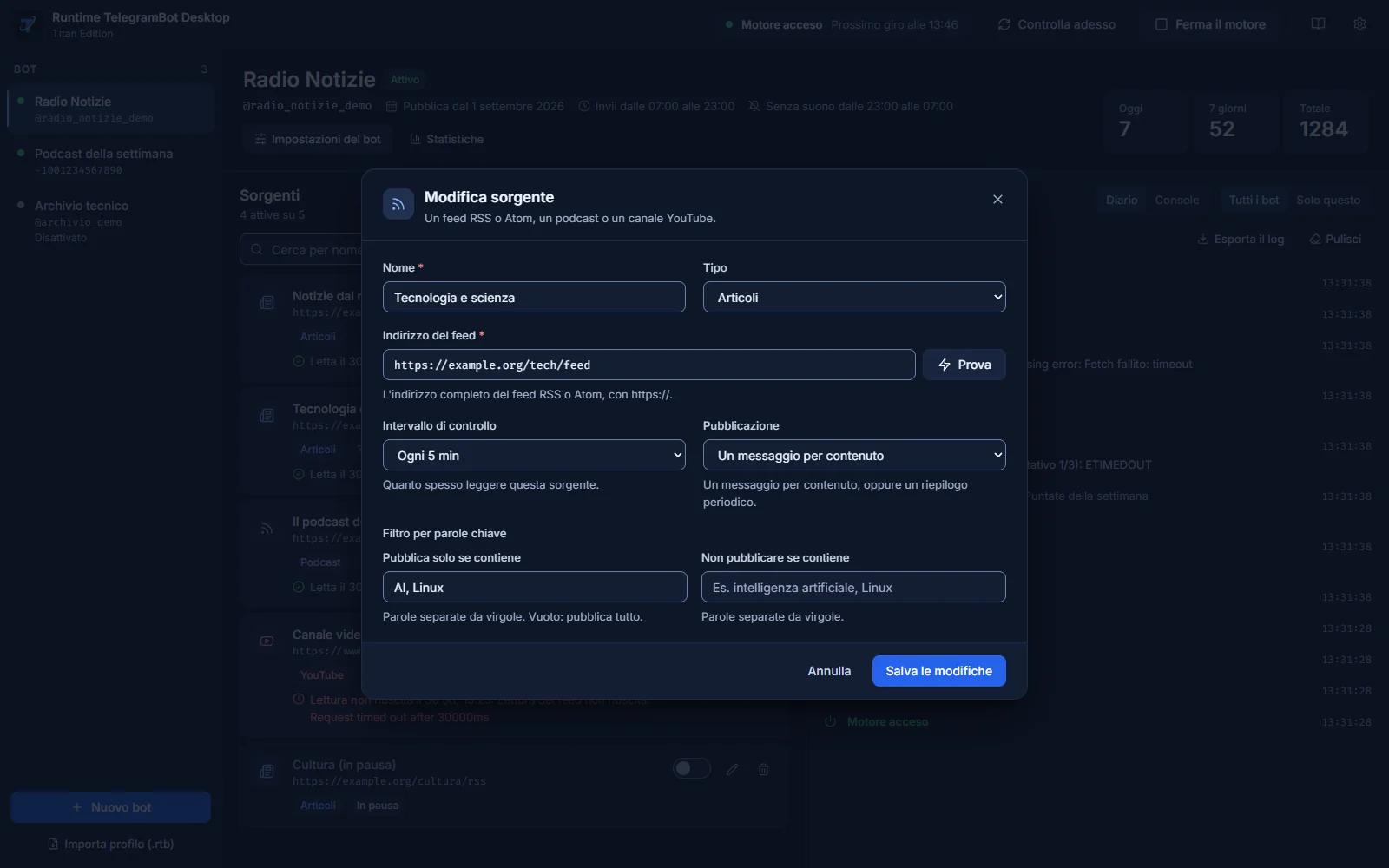
The sources panel is the bot’s «diet». For each source you give a name (which can be printed at the top of messages), choose the type and paste the address; the test button makes a real call and tells you at once whether it responds and how many items it found. Each source has a switch to pause it without deleting it, and a magnifier searches the bot’s sources by name, address, type and filter words.
Under every active source is the outcome of its last read: when, and how many items the feed held, or, in red, the failed read with the reason. Digest sources also say how many items are waiting for the next digest. There is no fixed cap on the number of sources.
YouTube is read without an API key and without Google Cloud, thanks to InnerTube, an engine that reads the pages as a browser would: just paste the channel handle (@RuntimeRadio) or its address. There is also an anti-premiere filter: a video marked as upcoming or premiere is discarded, and published only when it really becomes visible.
- Types
- News, for blogs, information sites and newspapers; Podcast, for audio streams, with cover art recovered from the iTunes tags of services such as Spreaker or AzuraCast; YouTube (Video), for channels.
- Keyword filter
- Two fields, include and exclude, with words separated by commas: with «include» only what contains at least one is published, with «exclude» anything containing even one is discarded. An amber badge flags it.
- Custom interval
- Each feed can have its own check rhythm, from 5 minutes to 24 hours, independent of the bot’s: more often for a very active site, less often for a slow one.
- Digest
- Instead of publishing each item as soon as it appears, Titan can accumulate them and send them in a single summary message, at a fixed cadence (1, 6, 12 or 24 hours, or 7 days), with the titles and the «Read» link, up to 20 items per message. A purple badge flags it.
- OPML import
- Whoever already has a list of feeds in an RSS reader imports it in bulk from a standard .opml file, with no external dependencies and with anti-SSRF validation. Titan says how many feeds it added.
Messages and templates
Each bot has four separate templates, one per format: Startup, News, Podcast and YouTube. They are written in the HTML supported by Telegram (bold, italic, monospace and links), with a visual editor. Above each area, the Smart Chips insert the variables, which the bot replaces with the real data at the moment of sending.
Titan cleans the text arriving from feeds of the source’s HTML tags (images, tables, paragraphs) and neutralises special characters before sending, so a «dirty» article cannot make the message fail. The eye-shaped button shows the preview with sample data, and the validator flags in real time unbalanced tags, non-existent variables and unsafe links. A template with errors cannot be saved; and if Telegram still refuses a custom template, the item goes out with the default template instead of being lost. The default templates follow the app’s language.
- {{title}}
- The title of the article or video.
- {{feedName}}
- The name given to the source in the Feed Manager.
- {{link}}
- The article’s address. It can be hidden inside the text with a link, for example «Read the article».
- {{summary}}
- A short preview of the text, 300 characters at most.
Quiet hours and the send queue
Many sources publish in the dead of night, and a notification at three in the morning is welcome to no one. With the Active Hours window (From, To) the engine does not stop: it keeps checking feeds and YouTube all night, but instead of sending it sets content aside in a persistent waiting queue, saved on disk, which survives even the computer being switched off.
As soon as the clock re-enters the window, the bot releases everything it has accumulated in chronological order, one post every 3 seconds; quiet hours also apply to digests and to the startup message. Failed sends are requeued up to 3 attempts. The base check interval runs from 1 to 120 minutes (15 by default), and a switch decides whether a desktop notification appears at every publication.
There is also a middle way: publishing without sound. Subscribers get the messages as usual, but the phone does not ring; it is chosen per bot, always or within a time window that can cross midnight.
Security and portability
Bot tokens are encrypted: Titan uses the operating system keychain (safeStorage) as the primary and AES-256-GCM with a machine-bound key as the fallback, for example on Linux without a Secret Service. Even if the program files are copied to another computer, the token stays unreadable.
Titan contacts only the servers of the configured feeds, api.telegram.org, the YouTube endpoints and GitHub for update checks. No telemetry, no analytics, no account. It allows a single instance at a time, so that two engines do not run on the same feeds and publish the same content twice.
- Database and backup
- Every day Titan saves a copy of the database in the backups folder by itself and keeps the last seven. Export the database creates a full clone of titan.db: profiles, feeds and the whole publishing memory. Import a database replaces it after a confirmation, puts the current one aside among the backups and, if the replacement fails, reopens the previous one. The file lives in a system folder separate from the program, so a reinstall does not touch it.
- .rtb format (OmniSync)
- To move a bot from one installation to another: name, feeds with filters, intervals and digest, topic and templates, but not the history. That is why an imported bot starts from now and does not republish the backlog; if another bot already posts to the same channel, it stays off and the warning says which. The token travels encrypted and tied to the computer: on the same computer it restores itself, on another it arrives empty and must be re-entered. The whole configuration, with all bots, can also be exported in a single file.
- Clear the history
- In each bot’s Advanced tab it erases the memory of what was published, and also zeroes the counters. After using it, it is wise to set the Start Date back to today, otherwise when the engine starts the bot republishes everything it finds in bulk.
Languages, guide and accessibility
The interface is in Italian and English, and the language is changed with a click. Italian is the source language: interface, guides and manual are born there and then carried into English. Since 2.5 the journal, system notifications and message templates follow the app’s language too; only the technical lines of the console stay in English.
The Quick Guide opens on screen in the chosen language and summarises how to get the token, the four wizard steps, how to add a source, customise messages and start the engine. The full manual, the Advanced User Manual, is downloaded as a PDF from the application.
The interface is accessible to WCAG 2.2 level AA, with a self-assessment documented in the repository: it can be used entirely from the keyboard, with focus always visible, zoomed from 80 to 180 per cent, and «Reduce motion and effects» stills it for those who prefer it or for slow machines, also following the system preference.
When something goes wrong
- A source is shown in red
- Under the source is the reason for the last failed read. A passing network error is retried by itself at the next round; an address returning 404 or a broken feed must be fixed in the source’s form, with the test button.
- The window is white at start
- It rarely happens, almost only on virtual machines. Wait about ten seconds: a safety mechanism forces the interface to appear. If it stays white, reinstall over the old one, without losing data.
- A YouTube feed shows «Cannot read properties…»
- The connection to YouTube is unofficial and now and then Google changes the code of its pages. Turn off the offending channel and wait for an update; News and Podcast keep working.
- «Bad Request: chat not found»
- The channel ID is wrong or, more often, the bot is not among the channel’s Administrators with permission to send messages.
- A second launch does not open a second window
- This is by design: Titan allows a single instance, and the second launch brings the existing window to the front.
- The image is a small square instead of the large preview
- It is Telegram’s behaviour when the source contains no large image but only a thumbnail. It is fixed on the site that publishes the feed, not in the bot.
The project
Titan was born in 2025 as a Python terminal script: it ran in a PowerShell window on Simone’s computer and posted every new episode of the Runtime Radio podcasts to a single Telegram channel, reading some thirty feeds written by hand. On 10 February 2026 the rewrite in TypeScript and Electron became Titan: several bots, several channels, articles and YouTube alongside podcasts. It was distributed as a commercial product until August 2026, when it was withdrawn from sale and opened under the MIT licence. The Python bot’s code is kept in the repository, as period material.
It is feature-complete and in production, with no planned development: it is maintained for fixes, and pull requests are welcome. Version 2.5 is a complete review born from an analysis of the code. It is free and open source, and will stay so; donating is optional and unlocks nothing.
The program was written making heavy use of large language models (Google Gemini, from 2.5 to 3.1, and Anthropic Claude, from Sonnet 4.6 to Opus 5.5), and the author states it openly. The concept, the project direction and the definition of every functional detail are Simone Pizzi’s; the models wrote the code, the decisions were his.
Technical sheet
- Version
- 2.5.0
- License
- MIT · free software
- Platforms
- Windows x64 · Linux x64 and arm64
- Architecture
- Electron 44 + React 18 + Vite 8 + SQLite (WAL)
- Telegram and YouTube
- Telegraf v4 · youtubei.js (InnerTube)
- Database
- Local SQLite, schema v14 · daily backup · encrypted tokens
- Network
- Outbound only · no cloud dependency
- Languages
- Italiano · English
- Updates
- From GitHub Releases · automatic on the Windows installer and AppImage
- Install size
- ~83 MB (Win) · ~90 MB (Linux)
- Status
- Feature-complete, maintained for fixes
Available
Ready to try it?
Get it from the releases page, with the source open.